EasyMedia PRO

Best WordPress Media Management Plugin with Powerful and Profitable Features

EasyMedia Pro is the ultimate all-in-one media management solution for WordPress. Take full control of your website’s media files with powerful features designed to boost flexibility and efficiency. With EasyMedia Pro, you can easily set file type restrictions, monitor server status, assign individual user storage limits, and access detailed upload logs and vibrant statistics — all from one sleek dashboard. See v1.0.8 – Change Logs

Don’t miss out — grab EasyMedia Pro today at a special discounted price!

98+
Ratings
WP Easy media Pro

No Recurring Payment — 50% Off Life Time Deal

Grab EasyMedia Pro now with a one-time payment — no recurring fees! Take full control of your WordPress media with powerful management tools, detailed insights, and total flexibility, all at a limited-time 50% off lifetime deal. 

Pricing Table

Single Site

One site license. One year premium support.

$29 Lifetime
  • 1 Site Lifetime License
  • 1 Year Support And Auto Update
Buy Now
POPULAR

Five Site

Five sites license. One year premium support.

$119 Lifetime
  • 5 Sites Lifetime License
  • 1 Year Support And Auto Update
Buy Now

Ten Site

Ten sites license. One year premium support.

$219 Lifetime
  • 10 Sites Lifetime License
  • 1 Year Support And Auto Update
Buy Now

100% No-Risk, 14-Day Money-Back Guarantee

We’re committed to delivering complete satisfaction through our dedicated help and support. If, for any reason, our plugin doesn’t match your expectations, you’re fully covered — we offer a 100% money-back guarantee within 14 days of purchase, no questions asked about of refund policy Learn More.

shamim hasan

Founder of CodePopular

codepopular_refund_policy

EasyMedia Pro – All in one media solution for WordPress

EasyMedia Pro is the all-in-one media solution for WordPress. Enhance your WP website’s media management and flexibility with the Easy Media Pro. Set file type restriction, website server status, Individual user storage limit, a WP vibrant statistics and uploads logs features comes with the plugin. Lets grab it with a discount price.

banner 1544x500 1

Why 100K+ Store Owners Choose EasyMedia

Increase Maximum File Upload Size​

Enhance your website’s performance, speed, and flexibility with the powerful EasyMedia Pro plugin. It helps you strengthen your website security, improve overall media management, and easily increase the maximum upload file size without any technical complexity.

With EasyMedia Pro, you can manage your media library more efficiently, control upload permissions, and optimize how files are handled on your site — making your WordPress experience smoother, faster, and more secure.

Set Upload Execution Time & Memory Limit in WordPress

This feature is designed to give your website the ability to handle heavy and time-consuming tasks without interruption. By extending the script execution time, you ensure that long-running processes—such as bulk media uploads, large data imports, backup operations, report generation, or complex file processing.

Many WordPress operations fail simply because the default execution time is too short. With this enhancement, your site can operate smoothly even under high workload conditions.

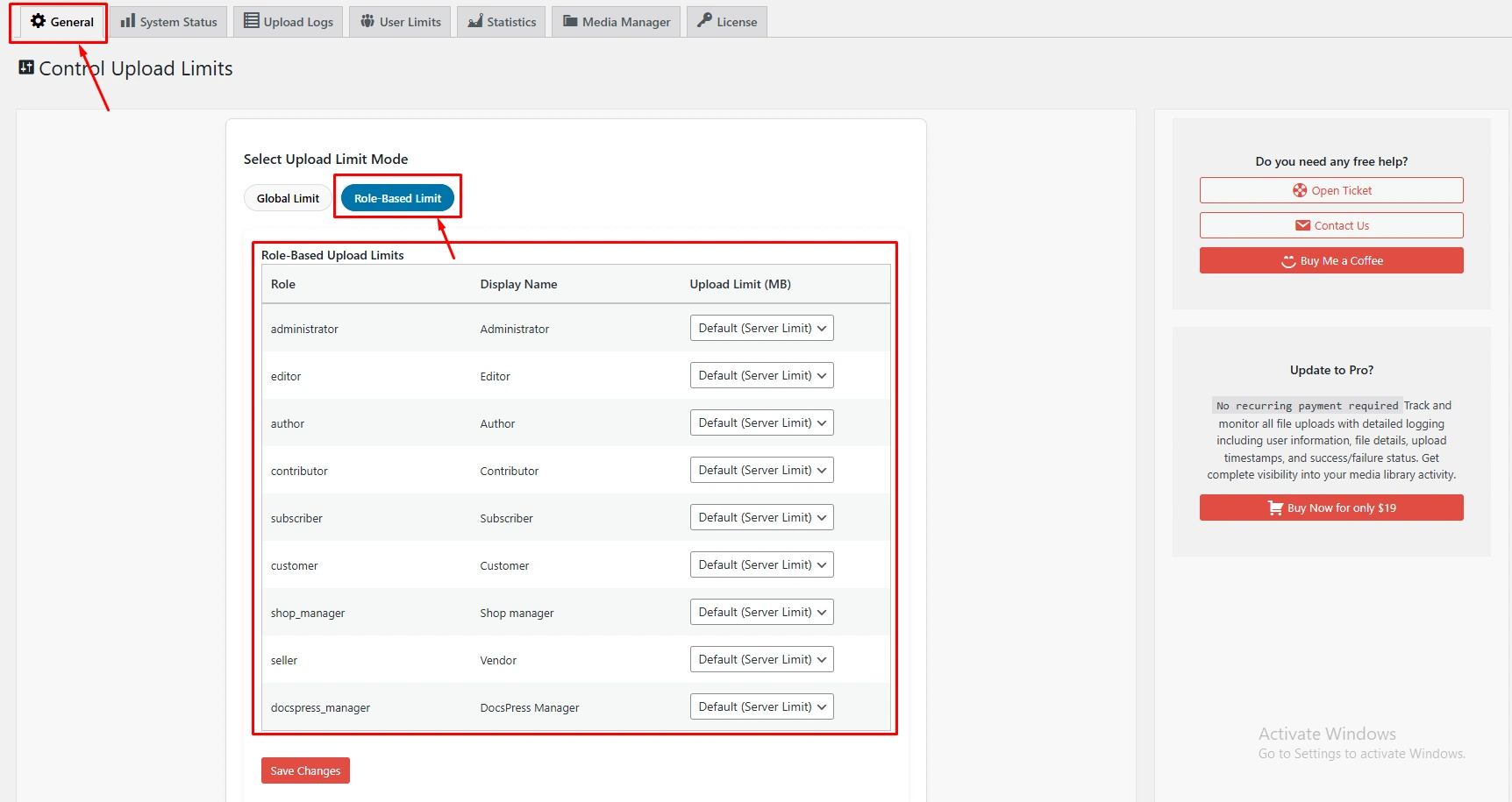
Role-Based File Upload Control

Easily manage file upload permissions based on user roles, giving you full control over who can upload files on your website. Assign specific capabilities to roles like Administrator, Editor, Author, or Subscriber, and set custom upload limits or restrictions for each. This ensures that only authorized users can upload files, keeps your media library organized, enhances security, and prevents unauthorized or unwanted uploads — making it perfect for multi-user websites, membership platforms, and blogs.

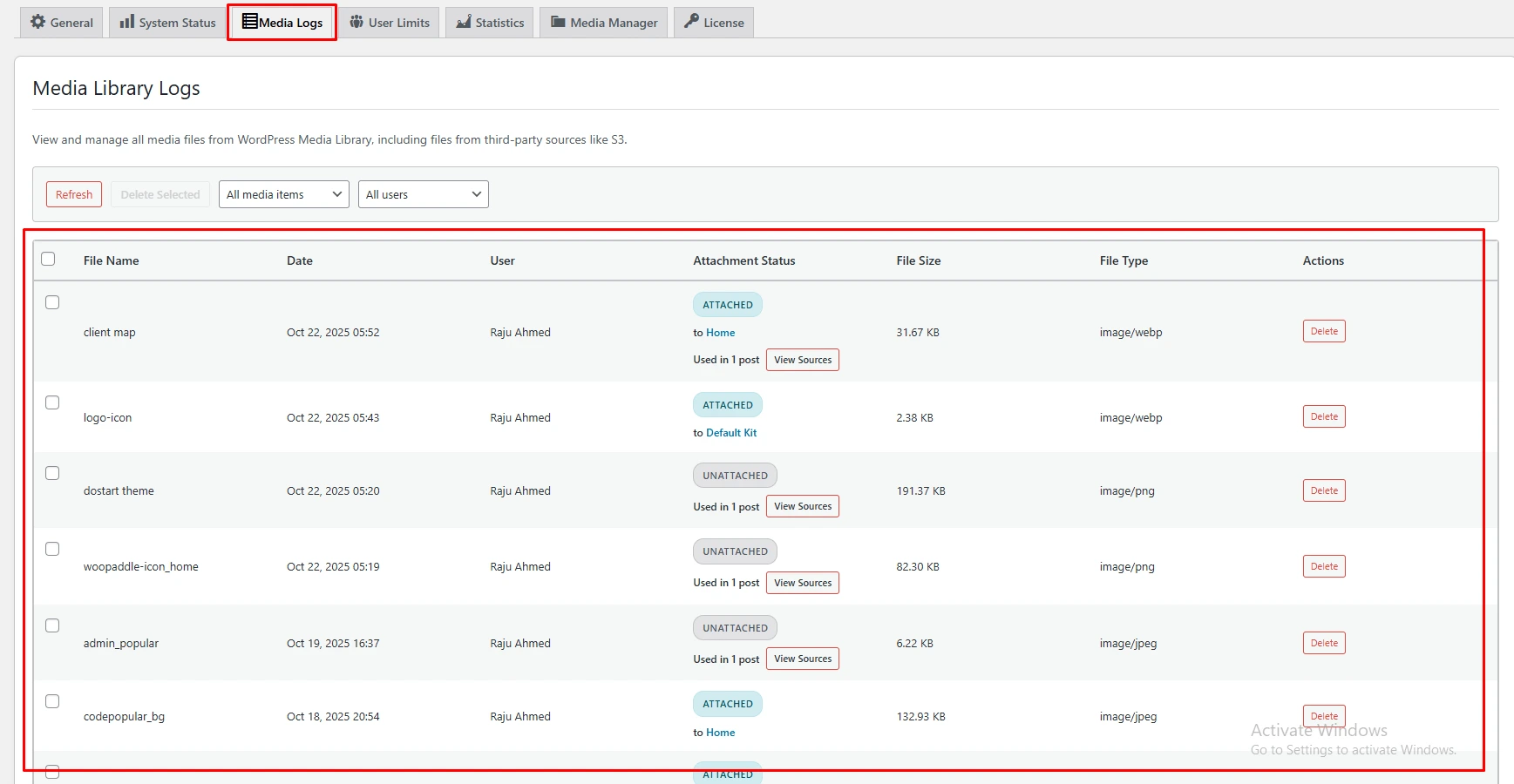
Attachment Logs​

The Attachment Logs feature lets you track every file uploaded to your website with complete transparency. It records essential details such as the file name, upload date, file size, uploader’s username, and user role, giving you a clear overview of all file activities. This powerful tool helps website owners monitor uploads, maintain accountability, enhance security, and ensure that every action within the media library is tracked and organized.

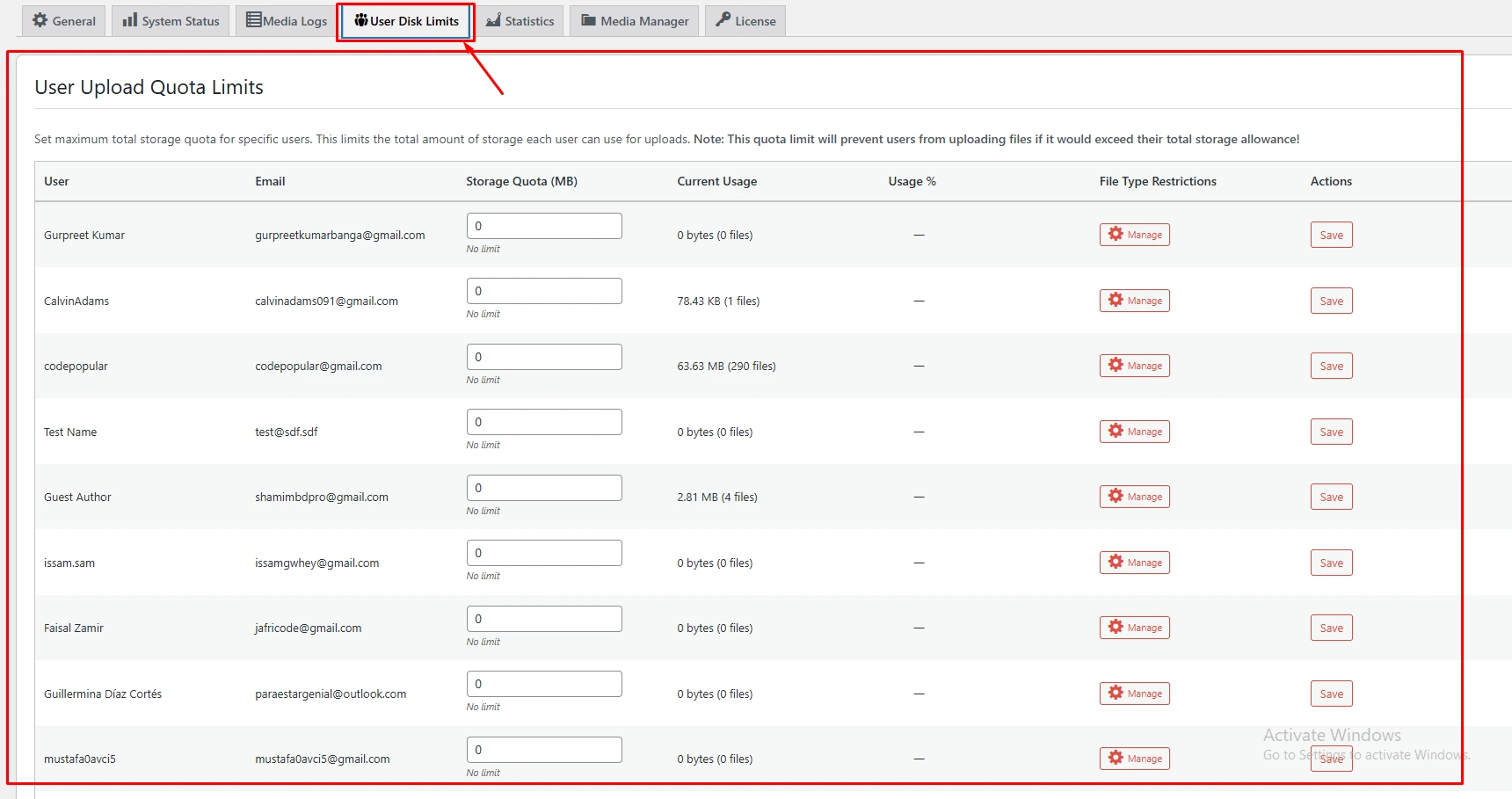
Set User Disk Limit

The User Disk Limit feature lets the website owner set a maximum storage capacity for each user or user role. This ensures that no user exceeds the assigned upload space, helping maintain server performance and prevent unnecessary storage usage. It’s an effective way to manage resources, especially for websites that allow multiple users to upload files regularly.

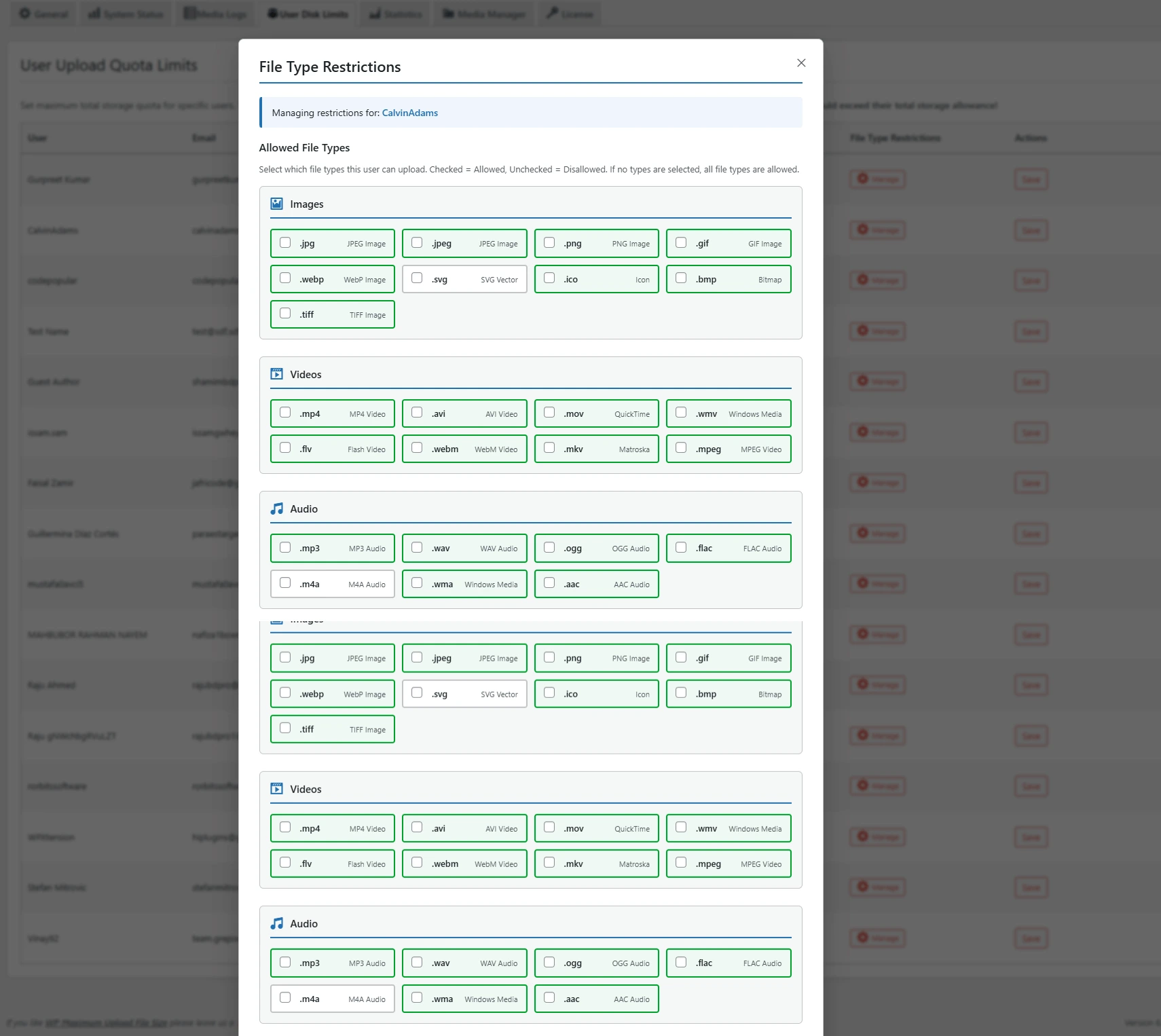
User Upload File Types Restriction

The User File Type Limit feature gives website owners complete control over which file formats users can upload, covering images, videos, and audio files. You can specify trusted formats such as .jpg, .png, .svg, .mp4, .mov, .mp3, and more, ensuring that only approved files are added to your website.

By restricting uploads to specific file types, this feature significantly enhances website security, preventing unwanted or potentially harmful files from entering your system. It also helps reduce storage clutter, keeps your media library well-organized, and ensures faster, more efficient management of uploaded content. 

Media Statistics​

The Media Statistics feature provides website owners with a comprehensive overview of all uploaded files across the site. It delivers detailed insights, including the total number of uploads, file size usage, top uploaders, and file type distribution, such as .jpg, .png, .pdf, and .mp4. By offering a clear picture of media activity, this feature allows you to monitor user uploads, analyze storage consumption, and make informed decisions to optimize your website’s performance and storage efficiency. Perfect for multi-user websites, blogs, and membership platforms, Media Statistics ensures better organization, improved resource management, and smarter media handling.

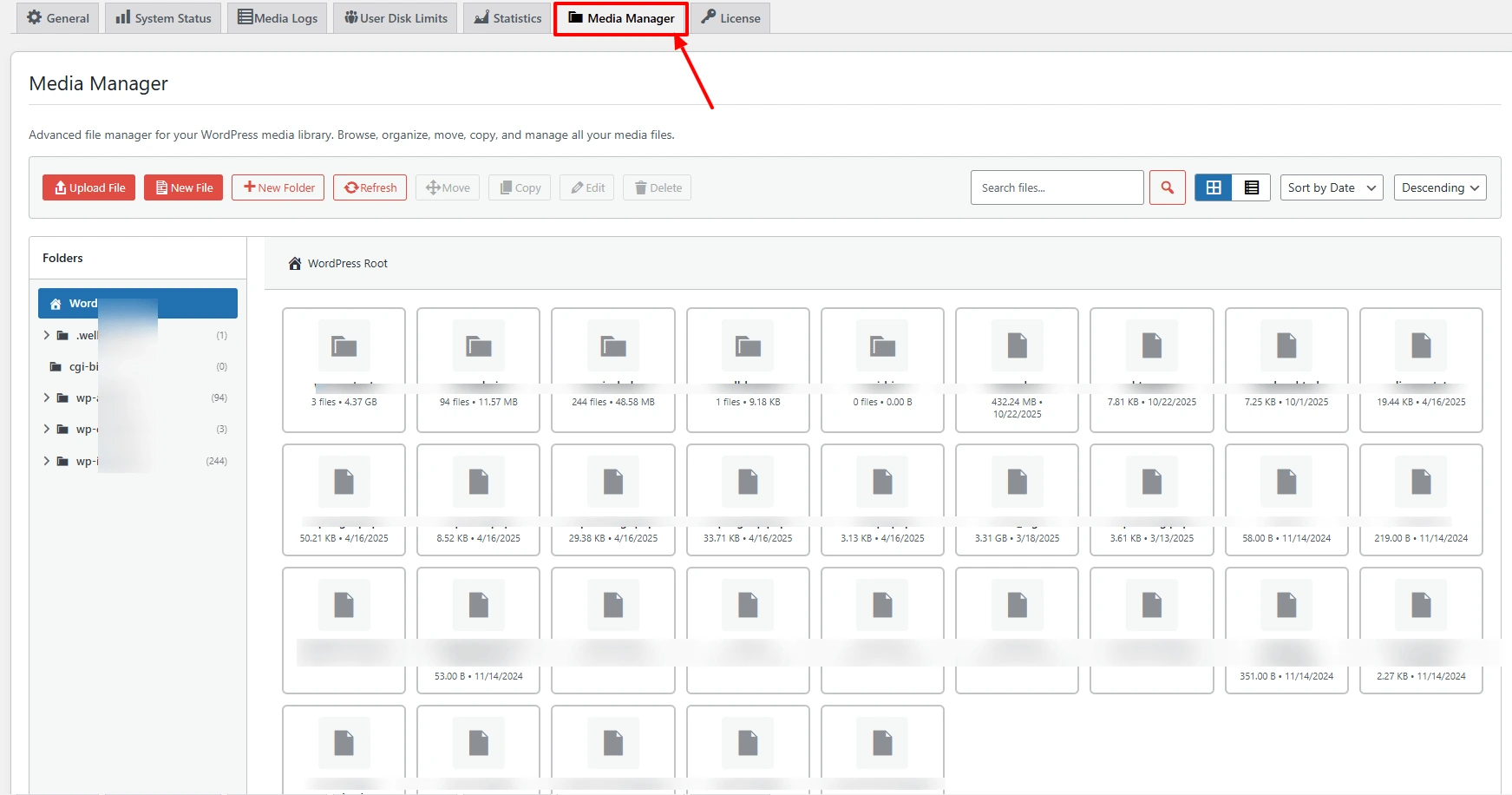
Advance Media File Manager

The Media File Manager feature allows the website owner to easily organize, view, edit, and manage all uploaded files from a single, user-friendly interface. You can rename, delete, move, or filter files by type, user, or upload date for better control. It supports various file types like .jpg, .png, .pdf, .mp3, .mp4, and .zip, ensuring all your media files are well-organized and easy to access.
Benefit: This feature simplifies file management, saves time, and keeps your media library clean and structured.

Why Choose EasyMedia Plugin

EasyMedia Pro gives you complete control over your WordPress media library with powerful features designed to save time, enhance security, and streamline your workflow. It’s fast, flexible, and built for anyone who wants a smarter way to manage media files.

No Recurring Payments

Enjoy complete transparency with EasyMedia. The plugin charges no hidden or recurring fees—you pay only once and get full access. This ensures a cost-effective, worry-free experience for every user.

Lifetime Automatic Updates

Get continuous improvements without any extra cost. With lifetime automatic updates, your plugin always stays compatible, optimized, and equipped with the latest features—ensuring your website runs smoothly year after year.

96+ Positive Reviews from Happy Users

We’ve received over 96 positive reviews from users who love EasyMedia Pro. Our customers appreciate its reliability, intuitive interface, and powerful media management features that make WordPress file handling simple and efficient.

Enhanced Security & Seamless Workflow

EasyMedia Pro keeps your media library protected with strict upload permissions and safe file-type controls. It ensures a smooth, organized, and reliable workflow for every user on your website.

Centralized & Simplified Media Control

Manage all your media files from one clean, unified dashboard. EasyMedia Pro lets you organize, view, and control every file efficiently without switching between different pages or tools.

24/7 Dedicated Support

Get help whenever you need it. We provide round-the-clock support to ensure your EasyMedia setup runs smoothly. Whether it’s installation, configuration, or troubleshooting, you can rely on fast and friendly assistance anytime.

Who Recomended EasyMedia

We are thrilled to see that some reputed companies have written articles and are recommending the use of our EasyMedia plugin. They found something valuable in our plugin through their real-life usage.

  • Author’s gravatar
    CalvinAdams
    5 months ago

    Great plugin. I got a lifetime license with regular price. Though its a beta version not completed all features yet. But happy to reserved the plugin for lifetime, Thanks!

Add a review

Your email address will not be published. Required fields are marked *

Yes, it works with all servers. However, please note that server-adjusted limits can’t be changed from a WordPress plugin. If the server’s set limit is 16MB, you can’t increase it to 128MB via WordPress. However, in that case, we chunk the large uploaded file into smaller pieces as a reflection of the upload time, which can be slower. But its possible to upload a big file if your server set upload limit is higher. Install the plugin, and it’ll inform you of the limits and the necessary actions.
Yes, Its allow you to set upload limit by role. So each individual WordPress role will have separate upload limit. For Ex: Administrator can upload max 10 GB, Editor can upload max 2MB, Author can upload max 5MB.
Absolutely right, The EasyMedia Pro can set individual disk limit for user. For ex: User A max limit set is 2GB then it can't upload files more than the 2GB
You can talk with us about the plugin here https://codepopular.com/contact