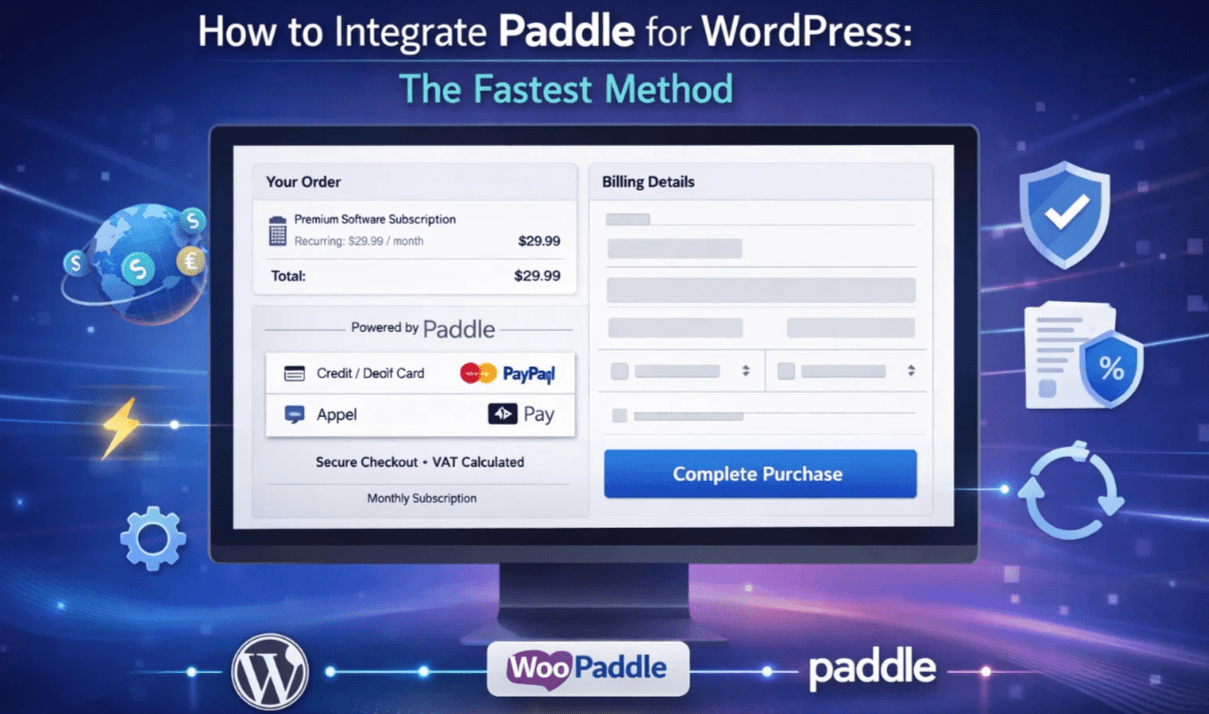
How to Integrate Paddle for WordPress: The Fastest Method
Selling digital products or software in the global market feels like an administrative hassle. It requires a payment system that supports global transactions, subscription billing, and tax compliance. This is where Paddle for WordPress comes in with a strong solution for developers, Saas founders, and digital product sellers.
Table of Contents
Paddle acts as a merchant of record to handle tax collection and complex financial compliance for your store. Automating revenue generation helps you focus on building products instead of auditing taxes.
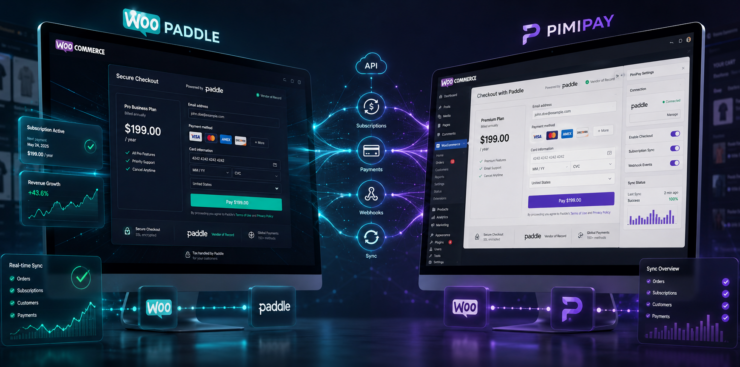
Most WordPress users pair Paddle with WooCommerce using a WooCommerce Paddle plugin. It helps you collect payments through Paddle while keeping checkout embedded on your site.
This guide explains the fastest method for connecting Paddle checkout to WooCommerce using WooPaddle. You will also learn the key features that make this integration effective for selling digital products in WooCommerce.
Why Paddle for WordPress is the Ultimate Growth Lever
Let’s first understand why Paddle stands out among other payment gateways before diving into integration steps.
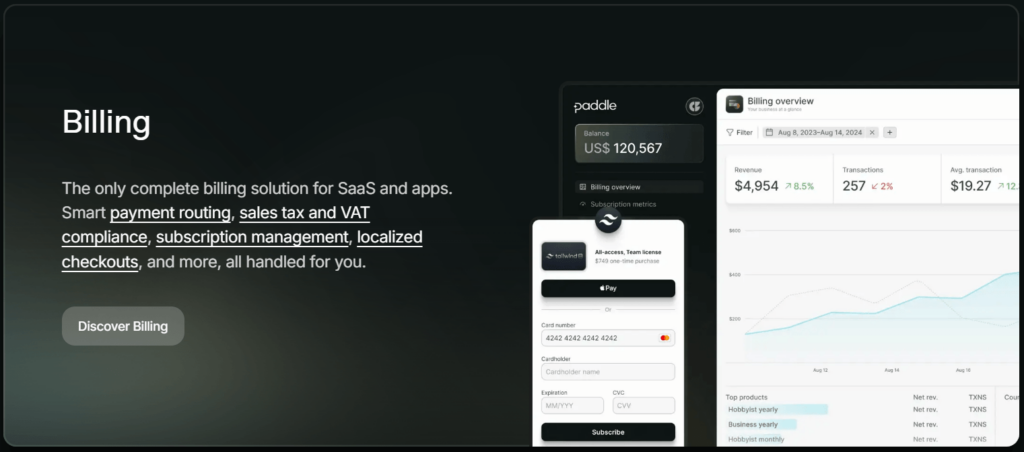
When you use the WooCommerce Paddle integration, you shift the burden of global tax compliance from your shoulders to theirs. Instead of monitoring tax rate changes in dozens of jurisdictions, you allow Paddle to act as the legal seller of record. This setup ensures that your WooCommerce plugin handles the heavy lifting of global payments automatically.
Here are the elite features that make this the superior choice:
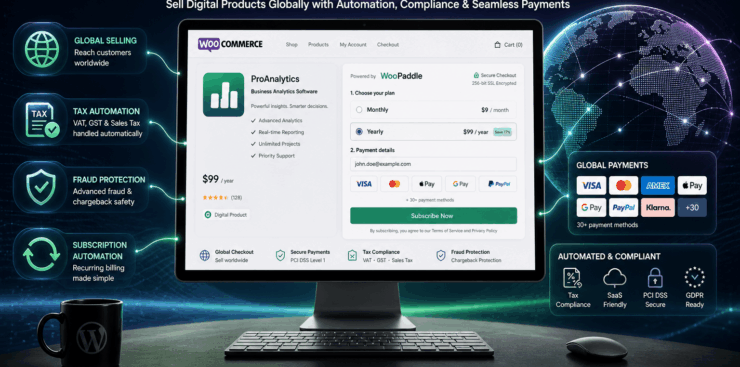
- Merchant of Record Service: Paddle takes full legal and financial responsibility for calculating, collecting, and remitting global sales tax and VAT on your behalf.
- Seamless Popup Checkout: This one-page WooCommerce checkout provides a modern, distraction-free overlay. It keeps customers on your site during the entire transaction to maximize conversion rates.
- Localized Payment Methods: The Paddle checkout for WooCommerce automatically presents Apple Pay, Google Pay, and PayPal to users based on their specific geographic location.
- Dynamic Multi-Currency Support: Your store will display prices in over 20+ different currencies to provide a native shopping experience for every international visitor.
- Comprehensive Subscription Management: This tool manages recurring billing cycles, automated dunning for failed payments, and trial periods without requiring third-party extensions.
- All-in-One Fraud Protection: Every transaction is screened by an advanced security layer that identifies and blocks high-risk payments before they reach your account.
- Automated Global Compliance: The system ensures that every sale complies with international financial regulations and automatically provides customers with tax-compliant PDF invoices.
Does Paddle integrate with WordPress effectively enough to scale your business? Yes, it does that by removing barriers of tax paperwork and localized checkout friction. As a result, you can focus entirely on product development.
Note: According to Paddle, more than 6,000 SaaS and software companies rely on its payment infrastructure.
Why WooPaddle Is the Best Way to Integrate Paddle for WordPress
WooPaddle is a Paddle WooCommerce plugin that helps you integrate Paddle with WordPress. This premium plugin is built professionally for deep integration with WooCommerce.
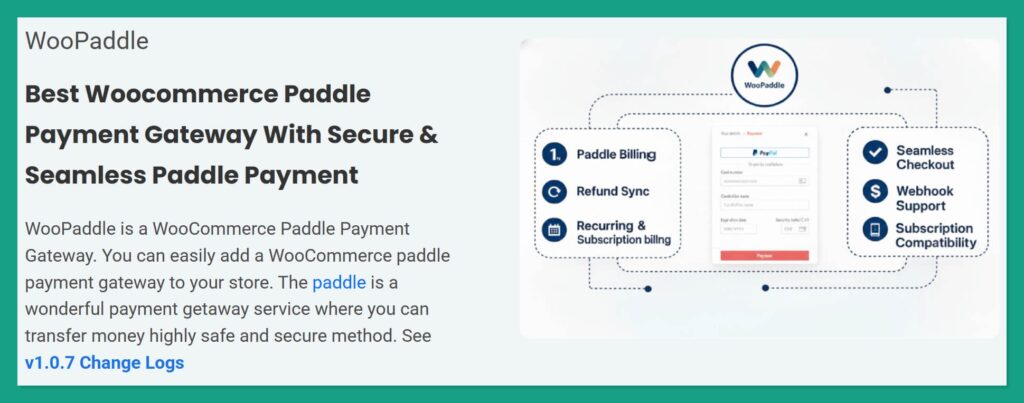
WooPaddle transforms Paddle from its standalone payment processor into an integral part of your WooCommerce store. Here are some of its core benefits that you will get by integrating Paddle for WordPress:
- Direct WooCommerce integration
- Subscription billing support
- Checkout customization
- Auoamted refund syncronizaztion
- Global payment compatibility
Integrating Paddle for WordPress takes five minutes since WooPaddle fits naturally into the existing payment gateways of WooCommerce.
What You Need Before Integrating Paddle for WordPress
You need a few essential components to integrate Paddle for WordPress in 5-10 minutes. You won’t need coding, but these steps are necessary to integrate Paddle with WooCommerce.
You will need the following things ready before starting the Paddle for WordPress integration:
- WordPress website: Self-hosted WordPress site with WooCommerce installed and activated.
- Products (digital): You can create yourself or upload your product file to the WooCommerce store.
- An active Paddle account: You can sign up for free and access immediately.
- The WooPaddle plugin: You can purchase and download it from its official product page.
Paddle provides a sandbox testing environment to simulate payments before launching live transactions. Testing in sandbox mode will significantly reduce the paddle for WordPress integration.
The Fastest Method to Integrate Paddle for WordPress
Now, let’s walk through the fastest way to integrate Paddle for WordPress using WooPaddle.
Follow these steps to have a working Paddle checkout for WooCommerce in under five minute:
Install and activate the WooPaddle plugin.
The first step is to install and activate the WooPaddle plugin before leveraging Paddle for WordPress.
Here are the steps to follow:
- Purchase and download the WooPaddle plugin from their official website.
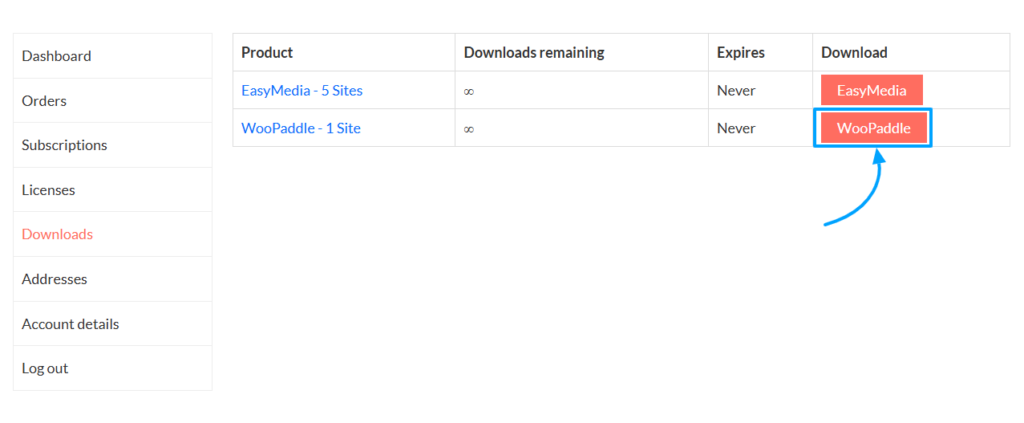
- Log in to your WordPress admin panel.
- Navigate to Plugins and click Add New.
- Select the Upload Plugin button at the top of the page.
- Choose the WooPaddle .zip file you previously downloaded.
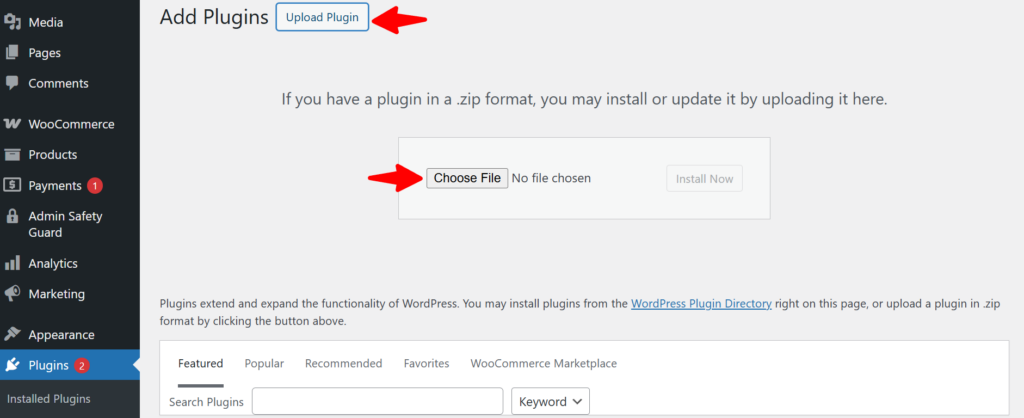
- Click Install Now to begin the installation.
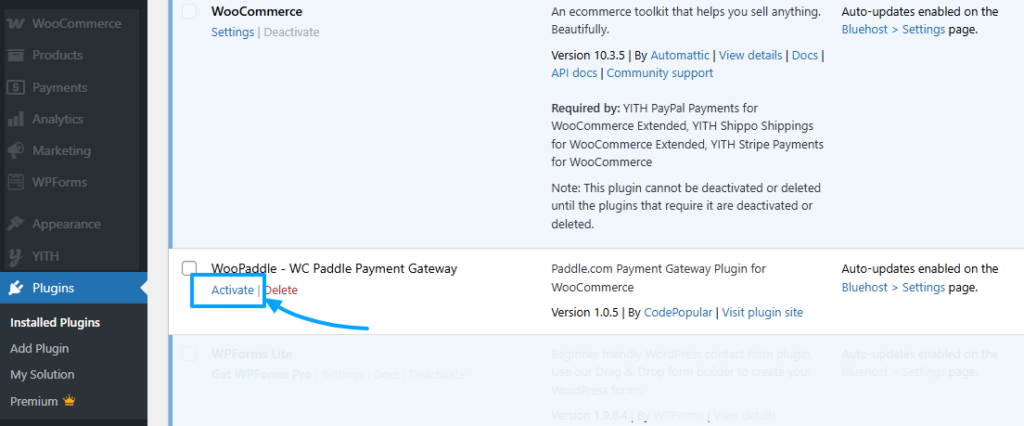
- Once installation is complete, click Activate Plugin to enable Paddle for WordPress functionality.
Activate Your Plugin License
Activating your plugin license is essential to unlock premium features and ensure full compatibility with Paddle for WordPress. Without a valid license, your plugin may operate in demo mode with limited functionality.
Process:
- Open the plugin’s settings page in your WordPress admin panel.
- Locate the license field provided by the plugin.
- Collect the license key from CodePopular.com > My Account > Licenses.
- Enter the license key.
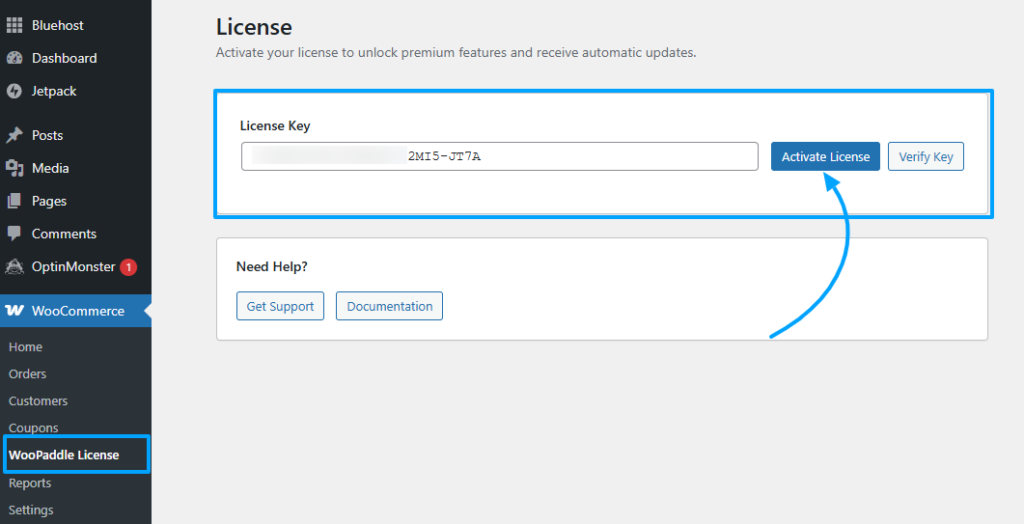
- Click Activate License to validate the key.
- If the license is valid, the plugin will confirm activation and enable premium features.
With a valid license:
- You can switch between sandbox and live modes for Paddle for WordPress.
- You gain access to support services and automatic updates.
- Your store operates with full reliability and compliance.
Until you activate your license, Paddle for WordPress will remain restricted to limited or demo‑mode tests. Therefore, you can’t run live transactions.
Get Your Paddle API Credentials
To connect Paddle for WordPress securely, you’ll need to retrieve your API credentials from your Paddle account. These credentials act as the bridge between your WordPress site and Paddle’s payment system.
Here are the steps to follow:
- Open a new browser tab and log in to your Paddle account.
- Click your profile icon in the top-right corner.
- From the dropdown menu, select Developer Tools.
- In the left sidebar, click Developer tools > Vendor ID.
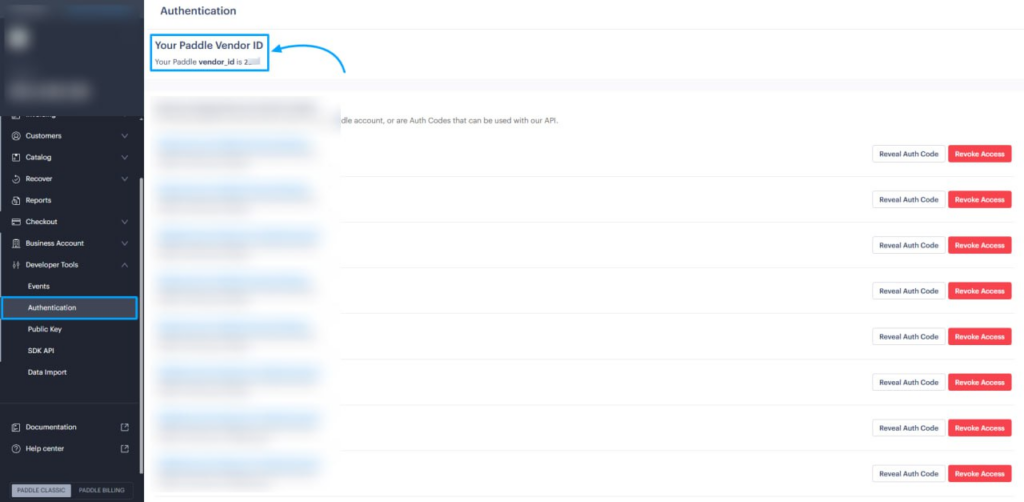
- Copy the vendor ID to a safe place.
- Now, click on Authentication, and generate an API code.
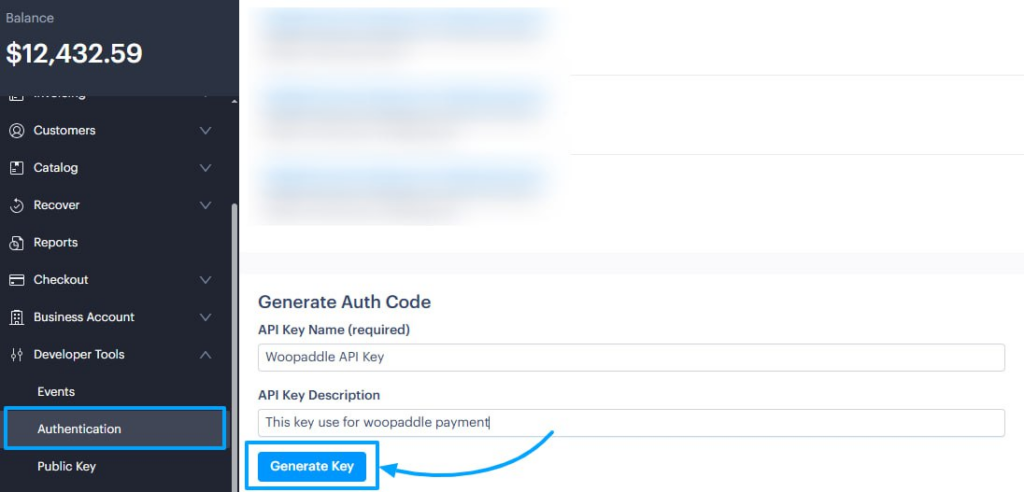
- Copy the API key value and store it securely.
Set Up the Webhook URL
To ensure your store receives real‑time payment confirmations, you must configure a Webhook. This step is critical for Paddle for WordPress because it allows Paddle to notify your WordPress site whenever a customer completes a transaction.
Process:
- Open the plugin’s settings page in your WordPress admin panel.
- Locate the unique Webhook URL provided by the plugin.
- Copy this Webhook URL.

- Log in to your Paddle dashboard.
- Navigate to the Webhook section under Developer Tools.
- Paste the copied Webhook URL into the designated field.
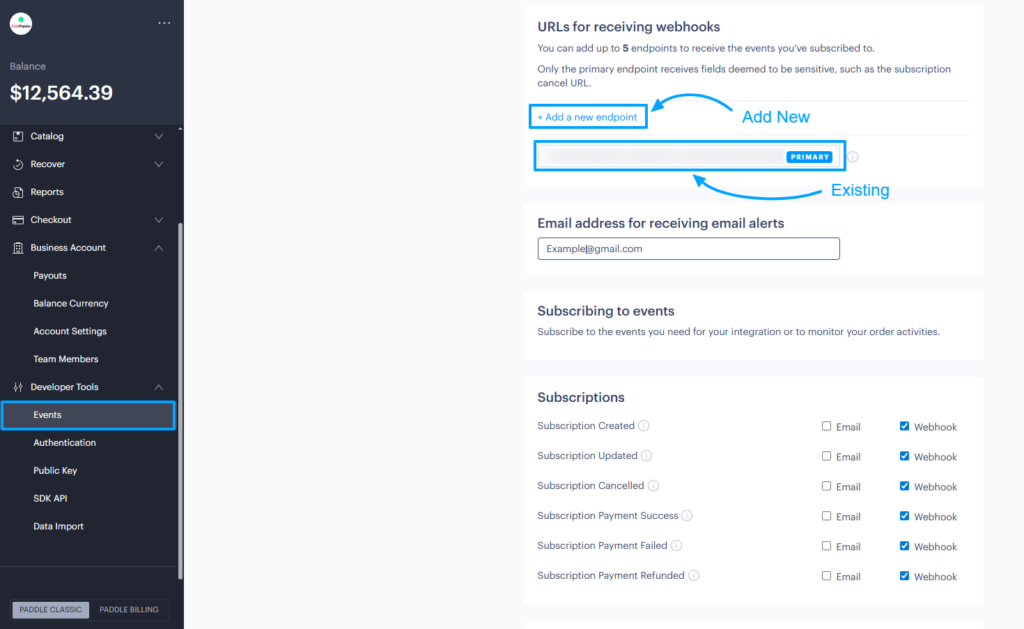
- Save your changes to confirm the setup.
Now, Paddle for WordPress will automatically update WooCommerce orders when payments are completed.
Configure WooPaddle in WordPress
Now, your WooPaddle is installed with your API credentials and Vendor ID at hand. The next step is to configure the plugin within your WordPress dashboard. Proper configuration ensures Paddle for WordPress operates smoothly as your payment gateway.
Here are the steps to follow:
- Return to your WordPress admin panel.
- Navigate to WooCommerce and click Settings.
- Select the Payments tab from the top navigation.
- Find Paddle.com Payment gateway in the list of payment methods.
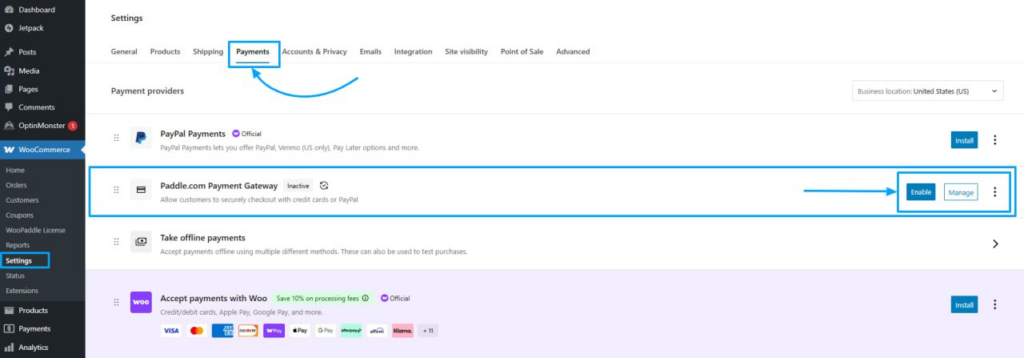
- Click the Manage button next to it.
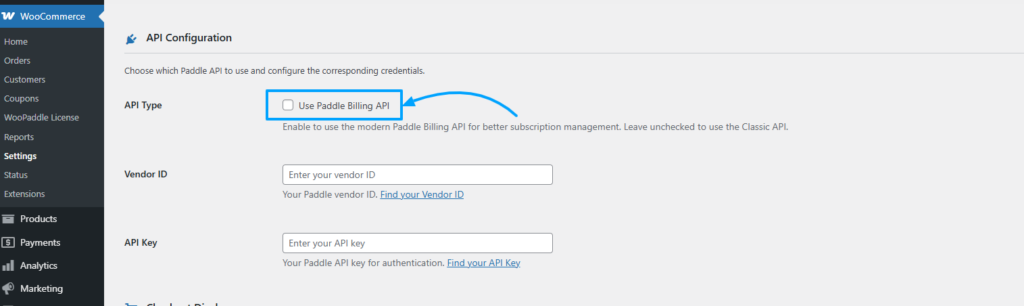
In the API configuration options:
- Check the box beside Use Paddle Billing API.
- Paste your Vendor ID and API Key into the corresponding fields.
- Enable Sandbox Mode if you want to test payments before going live. This routes transactions to Paddle’s test environment without moving real money.
- Choose your Checkout Type:
- Popup Checkout keeps customers on your site while displaying the Paddle payment form in a modal window.
- Paddle Checkout Page redirects customers to a hosted Paddle page.
- Popup mode is generally recommended for higher conversion rates since customers remain on your site.
- Click Save Changes at the bottom of the page.
Your integration with Paddle for WordPress is now complete, and your store is ready to accept payments.
Test the Checkout Process
It’s crucial to run a quick test to confirm that Paddle for WordPress is configured correctly. This ensures your checkout process works smoothly.
Here are the steps to follow:
- Add a product to your cart in WooCommerce.
- Proceed to checkout and select the Paddle payment option.
- Complete a sandbox payment using Paddle’s test card or PayPal sandbox credentials.
Verify the following outcomes:
- A Paddle checkout for WooCommerce that matches your domain.
- A successful order in WooCommerce with the correct total and status.
- A matching transaction in your Paddle dashboard.
If the test fails:
- Review the plugin’s logs if available.
- Double‑check your setup steps.
- Confirm that your domain is approved and that you are using the correct sandbox/live mode.
By completing this test, you validate that Paddle for WordPress is fully integrated and ready to process real transactions once you switch to live mode.
The Power of WooPaddle: Best Features for WooCommerce
WooPaddle is the most efficient choice for professional store owners to connect with WooCommerce. It transforms the standard checkout into a high-converting engine for digital product businesses. Here are some amazing features of WooPaddle that make Paddle for WordPress more reasonable:
Exceptional Checkout Experience with Popup and Overlay
The standard WooCommerce checkout often involves multiple page reloads that kill conversion rates. The Paddle for WordPress plugin introduces a modern pop-up overlay to rescue the conversion rate.
Here are some more benefits:
- Faster checkout flow
- Reduced cart abandonment
- Improved user experience
This keeps customers on your site during the entire transaction. By eliminating unnecessary redirects, you reduce friction. The checkout is fully responsive and optimized for mobile devices. This is critical since mobile commerce now accounts for more than 50% of online sales globally.
Data shows that keeping customers on the same website without redirection can increase the conversion rate by 35%. This is where WooPaddle stands out by keeping customers on your website while using the Paddle payment infrastructure.
Advanced Subscription and Recurring Billing Management
Managing subscriptions requires precision, whether it’s a SaaS business or membership sites. However, Paddle checkout for WooCommerce via WooPaddle lets you handle complex billing cycles directly. It manages dunning processes for payment retries when cards decline and sends automated emails to customers.
WooPaddle also handles:
- Monthly subscription plans
- Annual billing cycles
- Free trial periods
- Upgrade or downgrade options
After any payment update, it syncs them back to your WooCommerce dashboard. This ensures your recurring revenue remains stable without manual intervention.
Instant Product and Order Synchronization
Manual data entry is a significant source of error when it comes to product and order synchronization.
However, WooPaddle ensures that every product you create in WooCommerce is instantly recognized by the Paddle system. When an order is placed, the status updates in your WordPress dashboard in real time.
Here are some benefits of this feature:
- Accurate order records
- Automatic status updates
- Reduced manual administration
This synchronization covers everything from stock levels to customer details. This is how it ensures your backend operations remain clean and accurate.
One-Click Refund Syncing
WooPaddle uses Paddle webhooks to stay synchronized with every event. It auto-updates the corresponding WooCommerce order status whenever a renewal succeeds.
Processing a refund and return for a digital product is usually a multi-step process involving two different dashboards. With Paddle for WordPress integration, you can initiate a refund from the WooCommerce order screen.
The plugin communicates with Paddle to return the funds to the customer. This saves time and provides a better support experience for your buyers. Plus, your financial records stay perfectly aligned between both platforms.
Multi-Currency and Global Tax Automation
Paddle automatically displays prices in your customer’s local currency by detecting their location. WooPaddle enables this feature on WooCommerce stores without any extra configuration.
More importantly, the plugin fully supports Paddle’s merchant-of-record tax handling. You have to set your product prices once. When a customer checks out, Paddle calculates the correct VAT or sales tax based on their country. Then it adds the VAT to the total and remits it to the proper tax authority. So, you never touch a tax from or worry about audits.
Global compliance requires sending tax-compliant invoices to every customer. WooPaddle generates these automatically. The invoices include all necessary details, such as VAT numbers, company addresses, and localized tax rates. This feature alone can save your accounting team dozens of hours every month.
Lightweight Code and Dedicated Support
WooPaddle is built to integrate Paddle for WordPress with the highest performance in mind. The plugin adds minimal overhead to your site. Thus, page load times remain fast to maintain your conversion rate.
Google research indicates that even a second of delay in mobile page loading can cut conversions by 20%. WooPaddle helps you avoid this penalty with its lightweight code structure that processes payments without any friction.
WooPaddle comes with dedicated developer support that you won’t get in most free paddle plugins. You will receive professional, instant assistance whenever you encounter an issue by posting a support ticket. This peace of mind matters when your revenue depends on reliable payment processing.
Troubleshooting Common Integration Issues
Some occasional issues may arise while integrating Paddle for WordPress using WooPaddle. However, you can easily resolve those with the following steps:
Payment fails during testing: verify that Sandbox Mode is enabled and you are using the correct test card numbers. Live cards do not work in sandbox mode.
Orders appear in WooCommerce but not in Paddle: check your webhook configuration. WooPaddle automatically sets up webhooks, but firewall or security plugins can block them. Temporarily disable security plugins during testing to isolate the issue.
Subscription renewals do not update order status: Confirm that your Paddle account has webhooks enabled for subscription events. The WooPaddle documentation includes specific instructions for verifying webhook setup.
You can contact the WooPaddle support team directly if you aren’t able to resolve any issue.
Start Accepting Global Payments Today
You now have everything you need to integrate Paddle for WordPress within minutes. The process requires no coding skills, no developer hours, and no complex configuration.
WooPaddle handles the technical heavy lifting while you focus on creating products your customers expect.
Global eCommerce sales projections show it will reach 8 trillion dollars by 2027. Your digital business deserves a piece of that growth.
Paddle removes the barriers that keep digital product sellers from expanding internationally. WooPaddle brings that power into your WordPress dashboard with a setup so fast you will wonder why you waited.
Recommended Articles (Optional)
If you enjoyed this article, check out some of our other useful articles, where we share tips and tactics to grow your WooCommerce store and rate it from 0 to 100.
Here are a few you might find interesting:
8 Best WordPress Media Library Folder Plugins, where we’ve added a list of the best WordPress Media Library Folder Plugins that will help manage your files more efficiently and keep your media organized.
14 Best WooCommerce Recurring Payment Plugins for 2026, where we’ve created a list of the best WooCommerce recurring payment plugin that creates the foundation for a sustainable subscription business.
10 Fastest One Page Checkout for WooCommerce Plugins (2026 Edition), where we have curated a list of the 10 best one-page checkouts for WooCommerce. These plugins reduce the checkout distractions and create a smooth user experience.
WooCommerce Instant Checkout: Sell Faster and Boost Conversions, where we have shown how WooCommerce instant checkout minimizes every extra field, page load, and clicks.
 SHAMIM HASAN