
Powerful Tips to Add a WordPress Featured Plugin Successfully
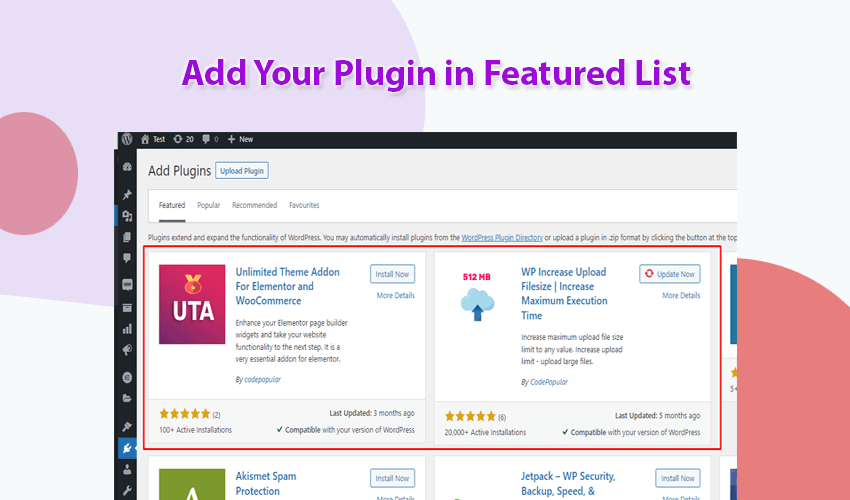
In this article, you’ll learn how to add your WordPress featured plugin according to your needs and extend its functionality using custom code. With a few smart tweaks, you can easily control how your plugin appears in the WordPress Featured Plugins section and make it more visible to users in the WordPress plugin directory.
This guide is especially useful for WordPress plugin developers who want to improve their plugin’s visibility and learn new optimization techniques. If you have multiple plugins listed on WordPress.org, these simple yet effective tips can help you promote your other plugins automatically when users install one of them.
By customizing the featured plugin arguments and extending WordPress functionality, you can make your plugin stand out and offer users a more connected, engaging experience. This not only helps in cross-promoting your plugins but also builds trust and brand recognition within the WordPress ecosystem.
Keep learning, experimenting, and optimizing — that’s how great developers grow in the WordPress community.
How to add the WordPress featured plugin in the Dashboard.
There are 3 steps you have to follow.
- Download the code snippet from our website.
- Create a new file like “class-plugin-suggest.php”
- Then put code into “class-plugin-suggest.php
- After adding code then you need to load the created file
<?php

/**
 * CodePopular_Plugin_Featured
 */
if ( ! class_exists( 'CodePopular_Plugin_Featured' ) ) {
  class CodePopular_Plugin_Featured {

    /**
     * Initialize Hooks.
     *
     * @return void
     */
    static function init(){

      if (is_admin()) {
        add_filter('install_plugins_table_api_args_featured', array(__CLASS__, 'featured_plugins_tab'));
      }

    }


    /**
     * Add our plugins to recommended list.
     *
     * @param [type] $res
     * @param [type] $action
     * @param [type] $args
     * @return void
     */
    static function plugins_api_result($res, $action, $args) {
      remove_filter('plugins_api_result', array(__CLASS__, 'plugins_api_result'), 10, 1);

      // Add plugin list which you want to show as feature in dashboard.

      $res = self::add_plugin_favs('wp-maximum-upload-file-size', $res);
      $res = self::add_plugin_favs('unlimited-theme-addons', $res);

      return $res;
    }


    /**
     * Helper function for adding plugins to fav list.
     *
     * @param [type] $args
     * @return void
     */
    static function featured_plugins_tab($args) {
      add_filter('plugins_api_result', array(__CLASS__, 'plugins_api_result'), 10, 3);

      return $args;
    }


    /**
     * Add single plugin to list of favs.
     *
     * @param [type] $plugin_slug
     * @param [type] $res
     * @return void
     */
    static function add_plugin_favs($plugin_slug, $res) {
      if (!empty($res->plugins) && is_array($res->plugins)) {
        foreach ($res->plugins as $plugin) {
          if (is_object($plugin) && !empty($plugin->slug) && $plugin->slug == $plugin_slug) {
            return $res;
          }
        } // foreach
      }

      if ($plugin_info = get_transient('wf-plugin-info-' . $plugin_slug)) {
        array_unshift($res->plugins, $plugin_info);
      } else {
        $plugin_info = plugins_api('plugin_information', array(
          'slug'   => $plugin_slug,
          'is_ssl' => is_ssl(),
          'fields' => array(
              'banners'           => true,
              'reviews'           => true,
              'downloaded'        => true,
              'active_installs'   => true,
              'icons'             => true,
              'short_description' => true,
          )
        ));
        if (!is_wp_error($plugin_info)) {
          $res->plugins[] = $plugin_info;
          set_transient('wf-plugin-info-' . $plugin_slug, $plugin_info, DAY_IN_SECONDS * 7);
        }
      }

      return $res;
    }

  }
}


/**
 * Initialize Class.
 */
add_action('init', array('CodePopular_Plugin_Featured', 'init'));
Plugin owners can greatly benefit by adding this simple code snippet to their projects. By including your plugin in the WordPress featured plugin list, you can significantly boost your plugin installations and reach a wider audience directly through the WordPress dashboard.
If you already have an established plugin on WordPress.org with thousands of active installations, you have a unique opportunity to recommend your other plugins to users when they install or explore new ones. This cross-promotion method not only increases visibility but also helps you build trust and brand authority within the WordPress ecosystem.
For WordPress plugin developers, this technique can be especially valuable. Alongside learning how to save plugin data in the database, mastering plugin suggestion functionality can help you grow your audience faster and make your new plugins gain traction more easily.
Implementing these plugin suggestion tips is one of the most effective ways to promote your work and ensure that new plugins get noticed — even in a competitive marketplace like WordPress.org.
When working with featured plugin functionality, make sure to change your class name (for example, rename
CodePopular_Plugin_Featuredto something unique for your project). Using a common class name may cause conflicts with other plugins that use the same class name or namespace. Always follow best practices by creating unique, project-specific class names to maintain compatibility and avoid potential errors.Also, remember that the plugin suggestion feature works only if your plugin is hosted on WordPress.org. If your plugin is hosted outside of WordPress.org — such as a custom website, GitHub, or a private repository — this feature will not function because WordPress pulls suggested plugins directly from its official repository API.
Following these practices ensures your plugin performs smoothly, remains conflict-free, and integrates properly with the WordPress.org ecosystem.

 SHAMIM HASAN

Thank you for this. I was looking everywhere for a solution. For those that want to remove the default featured plugins, in your `plugins_api_result` function, add the following above `$res = self::add_plugin_favs()`:
“`
$res->plugins = [];
“`
Thank you too.