
 November 8, 2025
Increase Upload File size in WordPress | Upload Large file in WP Media - 2025
Do you want to increase upload file size in WordPress? Sometimes, the default maximum file upload limit can prevent you from uploading large media files, installing plugins, or adding themes. In this article, we’ll show you how to increase upload file size in WordPress step by step, so you can manage your website more efficiently and avoid upload errors. This guide is perfect for beginners, developers, and website owners who frequently work with large files.
Why Increasing Upload File Size in WordPress Matters
WordPress is a powerful platform for building websites, blogs, and online stores, but sometimes its default settings can limit your capabilities. One common limitation many users face is the maximum upload file size, and increase upload file size easily. By default, WordPress restricts the size of files you can upload to your media library, which can prevent you from adding large images, videos, plugins, or themes. Then you need to help increase the upload file size.
Increase upload file size Is Important. This can be frustrating, especially if you want to upload high-quality media or install resource-heavy plugins that enhance your website. Small file size limits may lead to constant errors, wasted time, and a disrupted workflow. For businesses, content creators, and developers, these restrictions can slow down productivity and make managing your website unnecessarily complicated.
The good news is that you can easily increase the maximum file upload size in WordPress and increase upload file size. Doing so ensures that your site can handle larger files without issues, improves your workflow, and makes it easier to manage high-resolution media. In this guide, we will walk you through practical methods to increase your WordPress upload limit, fix upload errors, increase upload file size, and make your website more efficient. By following these steps, you can enjoy seamless media uploads, install larger plugins or themes, and enhance the overall functionality of your WordPress site.
How to Check Your Maximum File Upload Size Limit in WordPress?
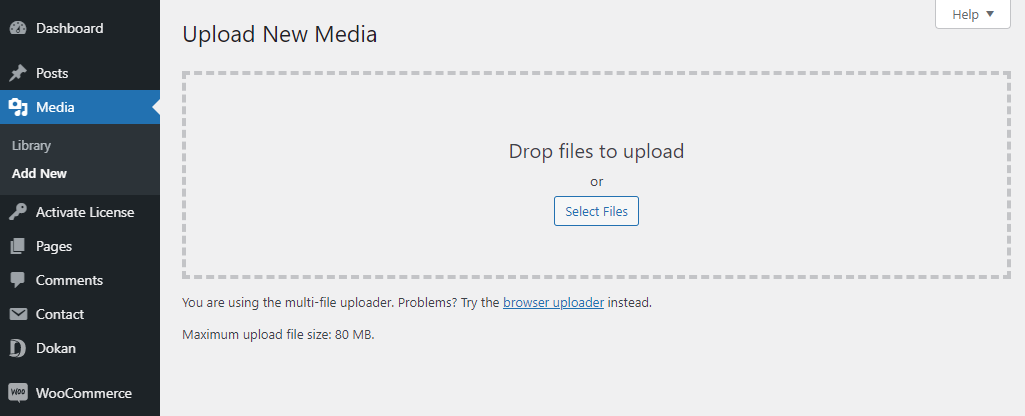
WordPress will, by default, show you the maximum file upload size limit when you are uploading images or media. To check if you can, simply log in to your WordPress dashboard, then go to the Media » Add New page and you will see the maximum file upload size limit for your WordPress site and check increase upload file size.
4. Simple way to upload maximum file size in WordPress?
- Theme Functions File.
- Create or Edit an existing PHP.INI file.
- htaccess Method.
- Add Plugin to upload increase maximum file size.
1. Theme Functions File.
Using this method we have succeeded to increase file size. so By adding this code in your WordPress function.php file you can increase the upload size:
@ini_set( 'upload_max_size' , '64M' );
@ini_set( 'post_max_size', '64M');
@ini_set( 'max_execution_time', '300' );
2. Create or Edit an existing PHP.INI file.
With this method you need to log in to your hosting cPanel > file manager then create a php.ini file in your WordPress installation root directory.
Most of the time WordPress users face this issue for using shared hosting, then you will not see a php.ini file in your directory. If you do not see one, then create a file called php.ini and upload it in the root folder. In that file add the following code:
upload_max_filesize = 64M
post_max_size = 64M
max_execution_time = 300
3. htaccess Method.
htaccess file edit is also a good way to quickly fix the problem. Some people have tried using the .htaccess method where by modifying the .htaccess file in the root directory, you can increase the maximum upload size in WordPress. Edit the .htaccess file in your WordPress site’s root folder and add the following code:
php_value upload_max_filesize 64M
php_value post_max_size 64M
php_value max_execution_time 300
php_value max_input_time 300