
 November 2, 2025
How to Set User Disk Limit in WordPress with EasyMedia Plugin - 2025
Do you want to set user disk limit in WordPress to control how much storage each user can use?
If your WordPress site allows multiple users to upload media files, managing disk space becomes essential. Without a proper limit, your server storage can fill up quickly — slowing down your website, increasing costs, and even causing downtime.
That’s where the EasyMedia Plugin comes in!
In this guide, you’ll learn step-by-step how to set a user disk limit in WordPress using EasyMedia, why it’s important, and how it helps improve performance, security, and scalability.
What is EasyMedia Plugin?
EasyMedia is a powerful WordPress media management plugin designed to make file handling simple and efficient. It follows WordPress standards for performance and usability.
It offers advanced tools like file organization, user-specific disk limits, and secure upload controls — all within the familiar WordPress environment.
The EasyMedia Pro User Disk Limit module is a professional-grade solution for managing user storage on WordPress sites.
Key Features of EasyMedia User Disk Limit
The EasyMedia User Disk Limit combines advanced performance, accuracy, and flexibility — all optimized for scalability.
✅ Accuracy – Real, disk-based calculations for precise usage tracking
✅ Efficiency – Uses native WordPress tables (no custom databases)
✅ Usability – Clean, intuitive dashboard with filters and sorting
✅ Scalability – Handles unlimited users with seamless pagination
✅ Security – Prevents misuse by blocking uploads before they exceed quota
✅ Flexibility – Per-user and per-role customization
Perfect for: Multi-author blogs, membership sites, LMS platforms, portfolio sites, news portals, and any site with multiple content creators.
Benefits of Setting a User Disk Limit in WordPress
Adding a user disk limit with EasyMedia helps you manage your site professionally. Here’s how it benefits site owners:
🎯 1. Cost Control
- Prevents unlimited storage usage
- Keeps hosting costs predictable
- Avoids unexpected server bills
🔒 2. Enhanced Security
- Prevents abuse of storage space
- Controls file upload activities
- Monitors user behavior
⚖️ 3. Fair Resource Distribution
- Every user gets a fair share
- Prevents one user from monopolizing storage
- Maintains balance across all users
🧹 4. Professional Management
- Keeps your media library clean and organized
- Encourages users to manage their space wisely
- Improves content curation and quality
🚀 5. Scalability
- Handles 10 or 10,000 users easily
- Consistent performance under heavy load
- Simplifies long-term site management
How to Set User Disk Limit in WordPress with EasyMedia
Follow these simple steps to configure user disk limits using the EasyMedia Plugin:
- Install and Activate EasyMedia Pro
Download and install the EasyMedia Pro plugin from the official website. - Enable the User Disk Limit Module
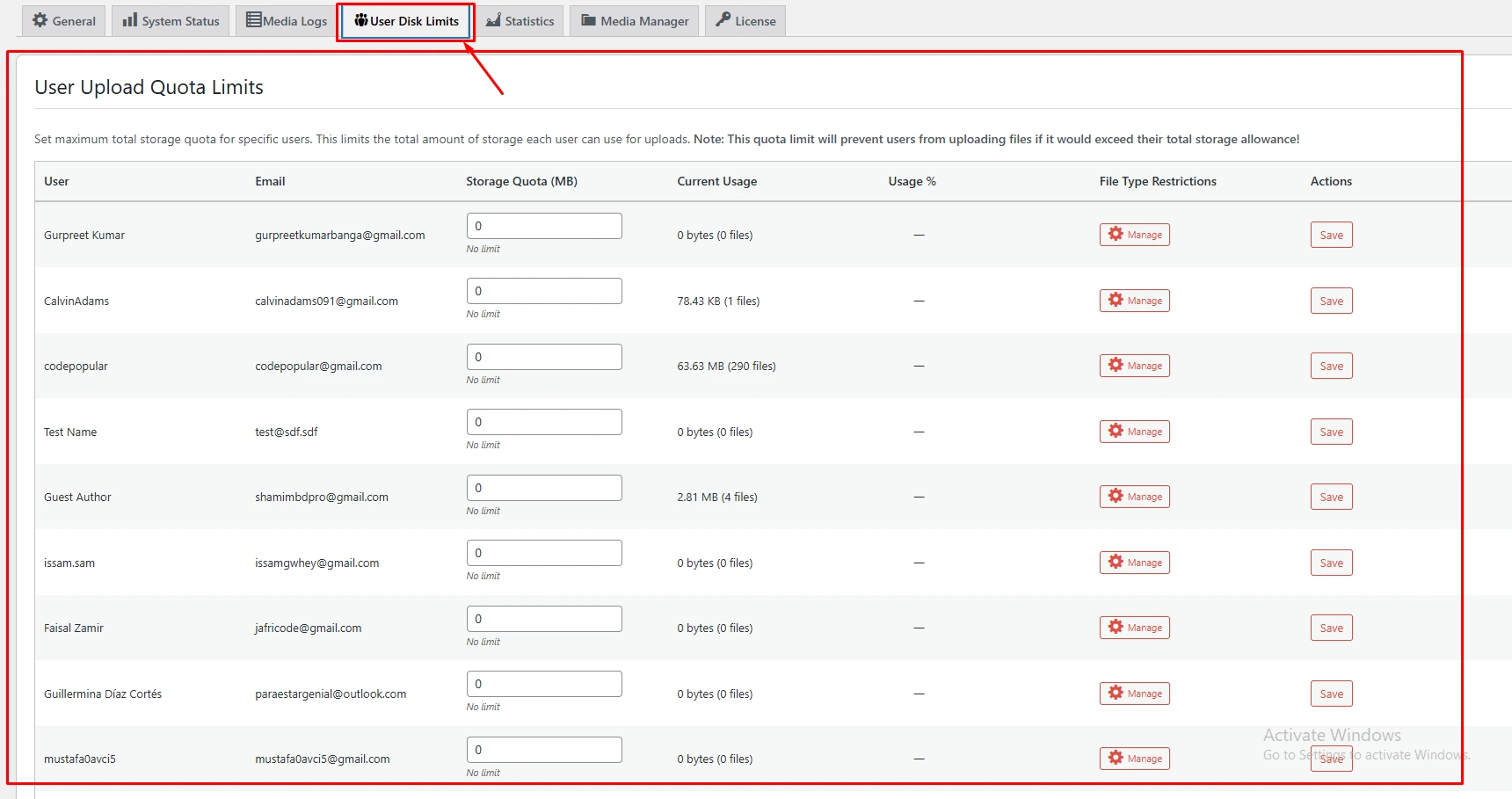
Navigate to EasyMedia → Settings→ User Disk Limit and activate it. - Set Storage Quotas per User or Role
You can assign custom storage limits individually or by user role. - Monitor Usage in Real Time
The plugin displays real-time usage data and percentage-based progress bars. - Filter and Manage Efficiently
Use filters to view users by name, role, or usage amount for quick management.
How EasyMedia Works
The EasyMedia User Disk Limit module tracks and restricts storage in real-time.
Admins can view usage statistics, assign custom quotas, and even restrict file types — all from one simple, user-friendly dashboard.
With pre-upload blocking, users cannot exceed their limit, ensuring your site stays clean, fast, and secure.
Why EasyMedia is the Best Media Management Plugin for WordPress
- All-in-one WordPress media solution
- No technical setup required
- Fully compatible with popular hosting environments
- Improves performance and user experience
- Makes your website more professional and organized
EasyMedia doesn’t just manage media — it optimizes your workflow and saves you money.
Final Thoughts
Setting a user disk limit in WordPress is essential for efficient site management — especially on multi-user platforms.
With EasyMedia Pro, you can control, monitor, and optimize storage effortlessly while improving security and performance.
If you want a professional way to manage your WordPress media storage, EasyMedia Pro is your best choice.