
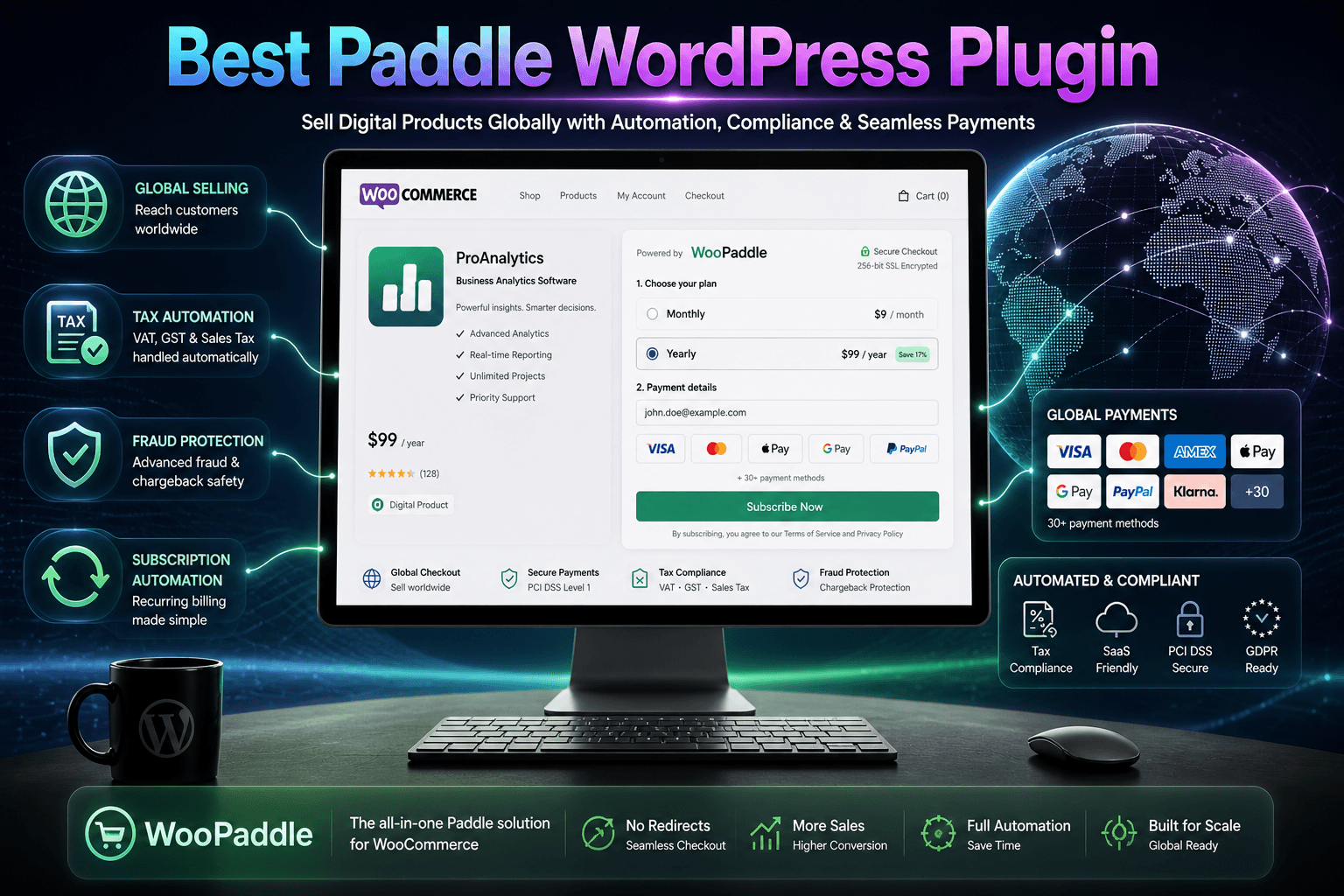
Best Paddle WordPress Plugin for WooCommerce 2026: Everything You Need to Know
Selling digital products or software subscriptions globally with your WooCommerce store comes with challenges. You have to handle complex international laws, recurring billing cycles, and diverse payment preferences for different countries. This is where a dedicated Paddle WordPress plugin becomes essential for your daily business operations.
Table of Contents
Paddle takes responsibility for handling sales tax, VAT, and GST compliance. It becomes the legal seller of your product by acting as a merchant of record. Paddle also handles fraud protection and chargeback liability for every transaction. However, it doesn’t offer a native WordPress plugin, which WooPaddle solves.
In this review, you’ll learn how WooPaddle transforms Paddle’s powerful payment system into WordPress. How it compares to its main competitor, and whether the investment in WooPaddle delivers the ROI for your business model.
Quick Answer: WooPaddle is a lifetime-licensed WordPress plugin that integrates Paddle’s merchant-of-record payment processing with WooCommerce. It enables store owners to accept global payments, handle automatic tax compliance and manages subscription billing. The pluginn supports both Paddle Classic and the modern Billing API.
What Makes Paddle Different from Traditional Payment Gateways
You must understand the Paddle merchant-of-record WooCommerce model before diving into WooPaddle.
The Merchant of Record Model Explained
Payment processors like Stripe, PayPal, and others act as payment facilitators. However, most of them won’t take the legal responsibility, fraud management, and regulatory compliance.

Paddle flips the traditional payment gateway model by positioning itself as the intermediary merchant. Paddle WordPress plugin purchases the product from you whenever a customer buys from your store. Then it resells the product directly to the end customer as a merchant of record for all sales transactions.
Your customer sees Paddle on their credit card statement alongside your business name. It serves as a clear visual indicator of the merchant-of-record relationship.
This matters because Paddle assumes all legal liability for:
- Sales tax and VAT compliance across more than 100 jurisdictions
- Fraud detection and prevention using machine learning analysis
- Chargeback disputes and resolution without involving you
- Currency conversion supporting 29 different currencies
- Regional payment methods, including iDEAL, SOFORT, and Bancontact
Choosing Paddle over a traditional payment processor comes down to pricing structure and long-term relationship investment. Here is a fact:
Note: Stripe will charge you around 2.9% plus $$0.30 per transaction. Paddle takes 5% plus $0.50.
However, Paddle gives you more freedom from tax & compliance obligations and administrative headaches. Otherwise, it would consume 15-20 hours per month handling global payments across different jurisdictions.
The WordPress Payment Processing Gap
WooCommerce dominates the WordPress e-commerce space with over 4.17 million active installations worldwide. Most stores use Stripe, PayPal, or Square as their payment gateway.
This works fine if you only sell domestically or do not mind handling tax compliance manually. But the moment you expand internationally, you face the following challenges:
Challenge 1: Tax Complexity Multiplies
Selling to customers in 10 countries means understanding 10 different tax systems. The EU alone has varying VAT rates across 27 member states. Plus, it comes with special rules for digital services under the OSS (One-Stop-Shop) system.
Challenge 2: Payment Preferences Vary by Region
A payment method popular in the United States means nothing to customers in the Netherlands. For example, iDEAL Wero dominates online transactions in the Netherlands. So, customers who expect their preferred payment methods will abandon the cart if they don’t get them.
Note: According to research, 13% of customers abandon their cart due to a lack of their expected payment method. With average cart abandonment rates hitting 70.19% in 2026, you cannot afford to lose that 13%.
Challenge 3: Subscription Management Gets Complicated
You need a recurring billing system while selling software licenses, memberships, and online courses. Thus, subscription and dunning (retry logic for failed payment) management, and customer self-service portals are needed. The Paddle WordPress plugin fulfills these requirements with advanced subscription management.
Paddle solves all three of these major challenges simultaneously through its merchant-of-record infrastructure. You will get enterprise-level payment processing by implementing this Paddle WordPress plugin.
How Paddle WordPress Plugin (WooPaddle) Works
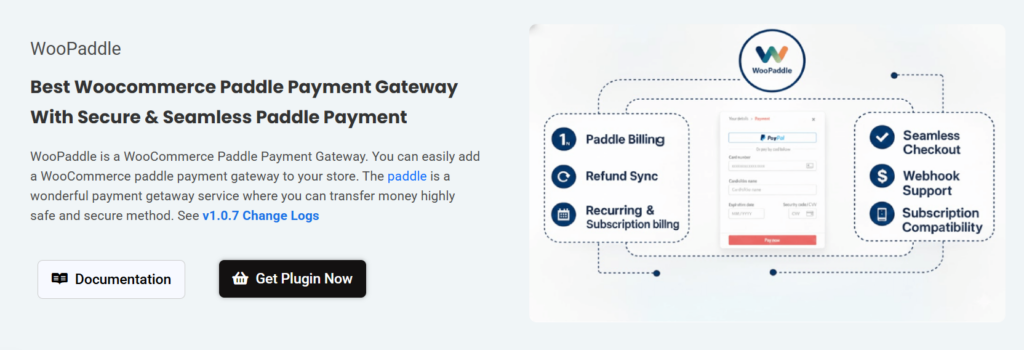
WooPaddle serves as the bridge between WooCommerce and Paddle infrastructure. This Paddle WooCommerce plugin creates smooth integration with the WordPress ecosystem.
Core Architecture and How It Works
Here is what happens when a customer goes through the checkout powered by WooPaddle:
- Customer adds products to the cart and proceeds to checkout
- WooPaddle displays Paddle’s secure payment window (pop-up or inline)
- Customer enters payment information directly into Paddle’s interface
- Paddle processes the transaction, collects applicable taxes, and handles fraud screening
- Paddle sends a webhook notification to WooPaddle confirming payment success
- WooPaddle creates the WooCommerce order and marks it as complete
- WooCommerce sends an order confirmation email and triggers the download delivery
This entire workflow happens within the familiar WooCommerce environment. Therefore, customers never leave your site, and you never touch sensitive payment data. Paddle handles PCI compliance, secure card storage, and payment processing infrastructure.
Dual API Support: Classic and Billing
One feature that sets WooPaddle apart is its support for both Paddle Classic and the modern Paddle Billing API. WooPaddle works with both the Paddle Classic and Paddle Billing API. This flexibility matters for existing Paddle users who migrated from Classic to Billing
However, WooPaddle recommends using the latest Paddle Billing API. It offers advanced features like usage-based billing, granular subscription controls, and enhanced reporting.
Note: Learn more about Paddle Classic vs Billing: Which Payment Gateway is Best for WooCommerce.
Block Checkout Compatibility
WooPaddle integrates smoothly with modern block-based checkout pages built using Gutenberg. It supports both traditional PHP template architectures and the newer block-based systems without requiring any modification or custom code. This feature keeps your checkout process intact across every theme, even if you migrate to a new one.
Paddle with WooCommerce: Features and Capabilities
Let’s learn why WooPaddle features matter for your WooCommerce business.
Complete Payment Method Coverage
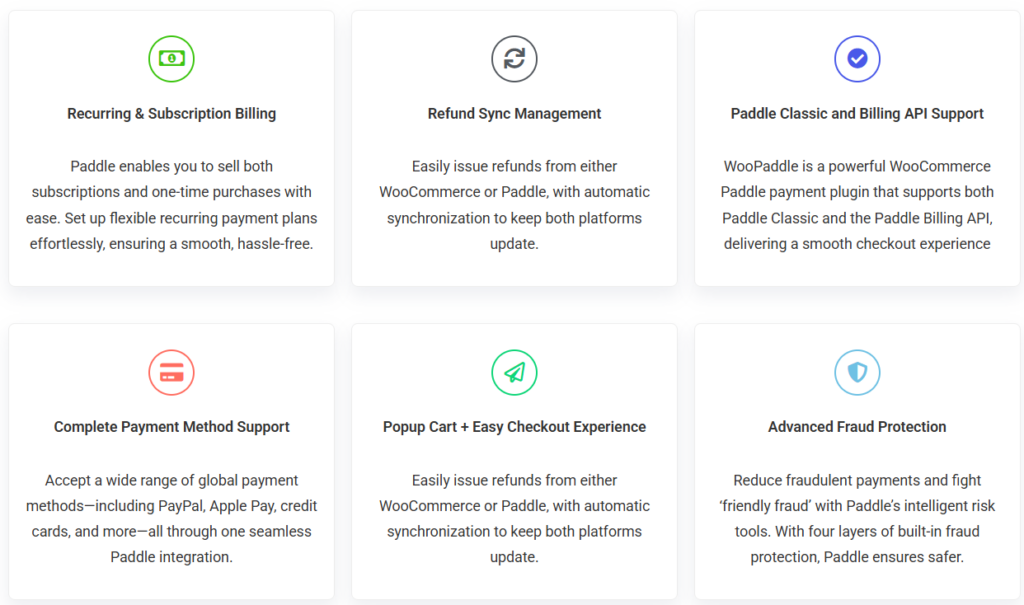
WooPaddle enables your store to accept:
- Credit and debit cards (Visa, Mastercard, American Express, Discover)
- PayPal, Apple Pay, Google Pay, and more options.
- Regional methods, including iDEAL (Netherlands), SOFORT (Europe), and Bancontact (Belgium)
Data shows that mobile cart abandonment reaches 80% compared to 67% on desktop. However, checkout methods like Apple Pay can boost conversion by upto 21%. The Paddle WordPress plugin makes it easy to enable high-converting payment methods.
Subscription and Recurring Billing Integration
Let’s say you are selling products with recurring revenue from your WooCommerce store. For example: software licenses, memberships, online courses, subscription boxes. WooPaddle integrates with the official WooCommerce Subscriptions plugin for recurring billing.
This Paddle WordPress plugin enables:
- Automatic renewal processing without manual invoicing
- Multiple billing cycles (weekly, monthly, quarterly, yearly, custom intervals)
- Upgrade and downgrade flows with prorated billing
- A customer self-service portal where users manage their own accounts
Automatic Tax Compliance From Various Jurisdictions
Without Paddle, you face registration requirements in every jurisdiction where you exceed sales thresholds. In the EU, that threshold is €10,000 in annual cross-border sales. Therefore, you must register for VAT in every member state where you have customers. The Paddle WordPress plugin eliminates this complexity.
Each registration requires:
- Obtaining a VAT number from local tax authorities
- Filing quarterly or monthly returns in the local language
- Remitting collected taxes by specific deadlines
- Maintaining compliant records for audit purposes
- Updating rates whenever governments change tax laws
Managing this complex administrative burden across multiple jurisdictions becomes overwhelmingly time-consuming. WooCommerce paddle integration eliminates the entire tax administration burden. It holds the following:
- Real-time tax calculation based on customer location and product type
- Automatic tax collection at checkout with correct rates
- Tax filing and remittance to the appropriate authorities
- Regulatory compliance with changing laws across jurisdictions
- Audit support if tax authorities have questions
This Paddle WordPress plugin saves an estimated 15-20 hours per month on tax administration work alone. This means you get a significant opportunity for cost recovery.
Refund Synchronization Between Platforms
Managing refunds usually requires jumping between different dashboards. Issue a refund in Stripe, and you must manually mark the WooCommerce order as refunded. Forget this step, and your sales reports show inflated revenue.
WooPaddle solves this with bidirectional refund sync:
- Process a refund in your WooCommerce dashboard, and it automatically refunds through Paddle
- Process a refund in your Paddle dashboard, and WooPaddle automatically updates the WooCommerce order status
- Partial refunds work the same way with amount synchronization
- Refund reasons and notes transfer between systems
This feature saves your customer service team hours of manual data entry. They can work entirely within the WooCommerce dashboard without logging into the Paddle dashboard.
Sandbox Testing for Development and QA
You should never launch a payment gateway without testing it first. WooPaddle includes complete sandbox mode support.
Enable sandbox mode in the plugin settings, and you can:
- Process test transactions using Paddle’s test card numbers
- Simulate successful payments, failed payments, and fraud flags
- Test subscription renewals and cancellations
- Verify webhook delivery and order creation
- Confirm email notifications trigger correctly
The sandbox environment mirrors your production setup exactly in every meaningful way. You simply switch to live mode after testing confirms that everything is working correctly.
Advanced Fraud Protection with Liability Transfer
E-commerce fraud costs online merchants billions annually. Traditional payment processors run fraud detection. However, you remain liable for chargebacks when fraudulent transactions slip through.
Paddle for woocommerce approaches fraud with four detection layers:
- Analyzes browser characteristics, IP addresses, and device identifiers to detect suspicious patterns.
- Examines how customers interact with your checkout (mouse movements, typing patterns, time spent on page) to identify bot activity.
- Compares purchase details against known fraud signatures from Paddle’s network of thousands of merchants.
- Assigns a risk score to every transaction based on hundreds of signals, automatically blocking high-risk orders.
Paddle absorbs the loss whenever a fraudulent transaction gets approved and later disputed. You receive the full revenue from every transaction Paddle approves.
Real World Use Cases for WooPaddle
Here are some real-world use cases of the WooCommerce Paddle payment gateway
WordPress Plugin and Theme Developers
You will struggle with EU VAT compliance while selling software licenses. This WooCommerce payment gateway for SaaS automates tax handling across 100 jurisdictions.
A developer earning $240,000 annually can save over $12,000 in accounting fees by letting Paddle handle the tax filings. Paddle WordPress Plugin also manages your license delivery and subscription renewals without any manual intervention.
Digital Product Marketplaces
Your WooCommerce store should have a localized payment method when selling to customers in 50 different countries. You can increase conversion upto 7.4% by offering additional relevant payment methods. WooPaddle provides these local payment methods to ensure your global customers feel comfortable during the checkout process.
Note: Learn the process to sell digital products with Paddle on your WooCommerce store.
International Course Creators
Selling courses to European students requires adherence to strict GDPR and VAT rules. This is where the Paddle WordPress plugin acts as the merchant of record. It ensures all your B2B sales use the correct reverse charge mechanism. This gives you peace of mind that you will not face surprise tax bills or regulatory penalties from foreign governments.
How to Set Up the Paddle WordPress Plugin
Setting up your Paddle billing integration for WordPress is a straightforward process that takes less than half an hour.
Step 1: Purchase and Install WooPaddle
Here is how you can purchase the Paddle WordPress plugin and add it to your site:
- Purchase WooPaddle from codepopular.com.
- Navigate to your account area to download the zip file.
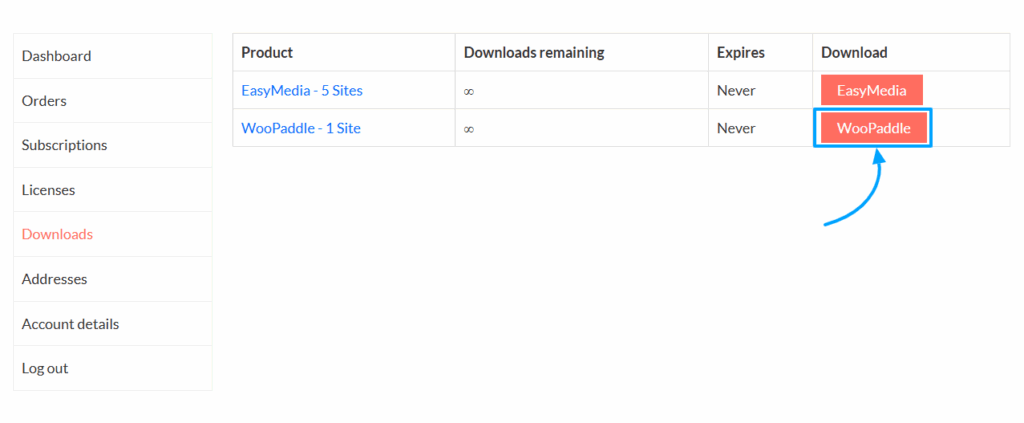
- Now navigate to Plugins > Add New and click the upload button.
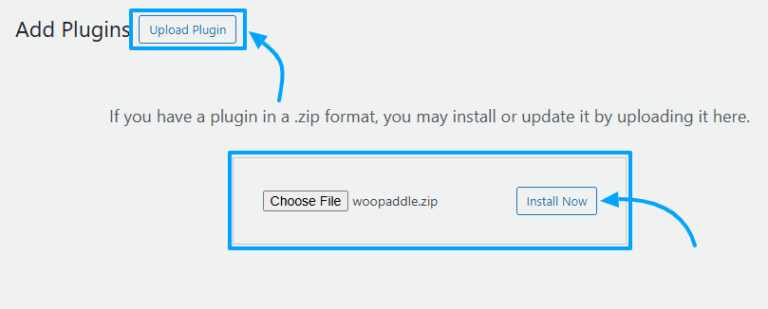
- Install and activate the plugin to make it visible within your settings.
Step 2: Activate Your License Key
Validate your purchase by activating the license using the following steps:
- Locate the WooPaddle settings within your WordPress admin panel to find the activation area.
- Copy the license key from your CodePopular account dashboard.
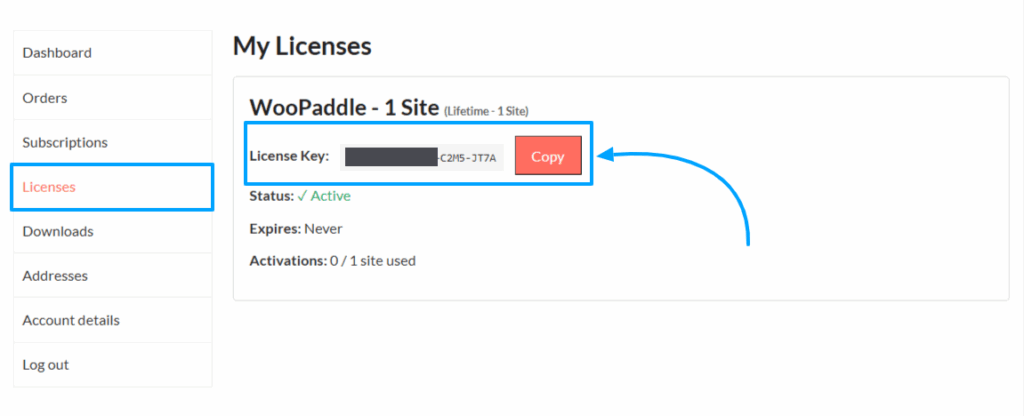
- Paste this key into the license activation field on your website.
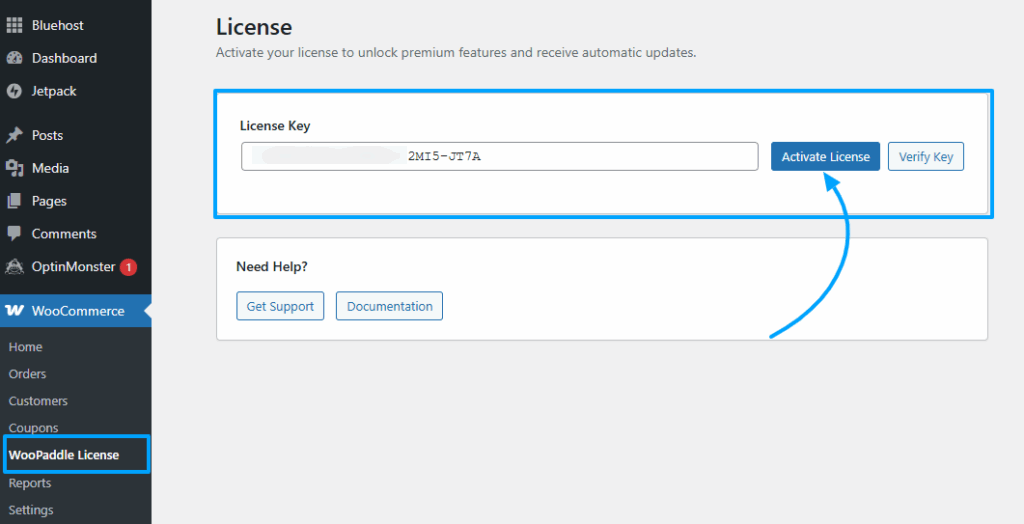
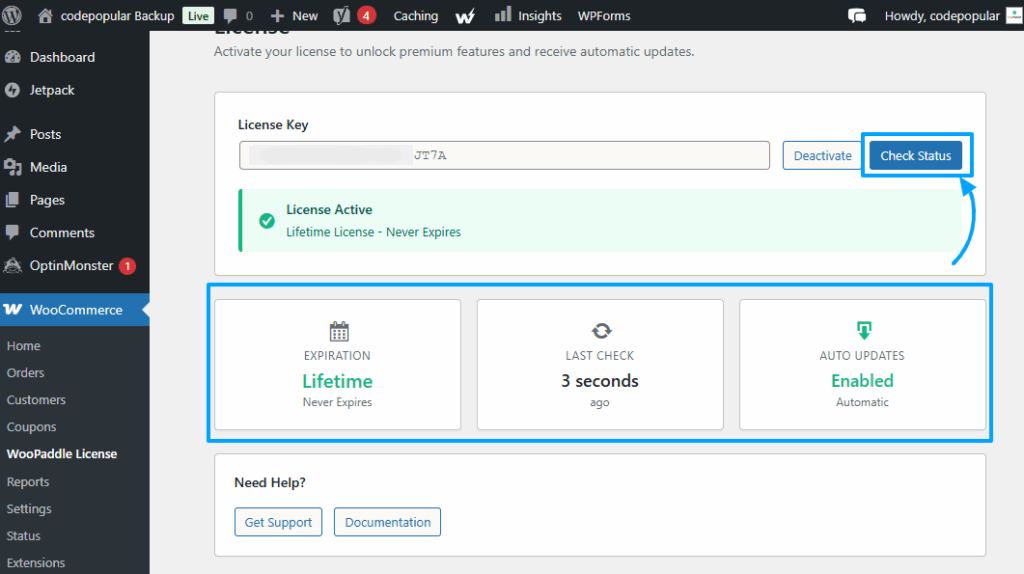
- Confirm the activation to remove the limitations of the demo mode.
Step 3: Retrieve Your Paddle Billing API Credentials
Your store requires specific credentials from the Paddle dashboard to communicate with the payment server. Follow these steps:
- Generate a new API key in the authentication section of your Paddle developer tools.
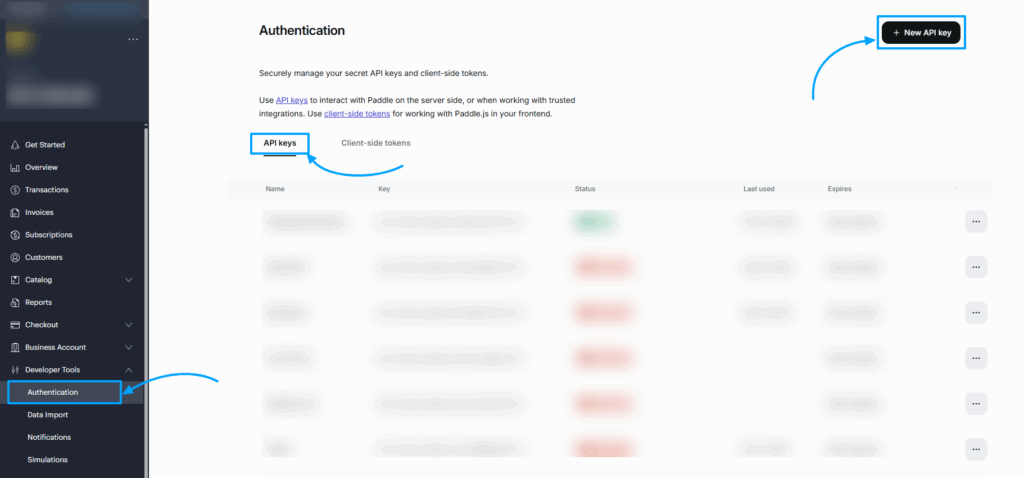
- Set the key permissions to read and write while ensuring the expiration is set to never.
- Create a new client-side token specifically for your website domain in the authentication tab.
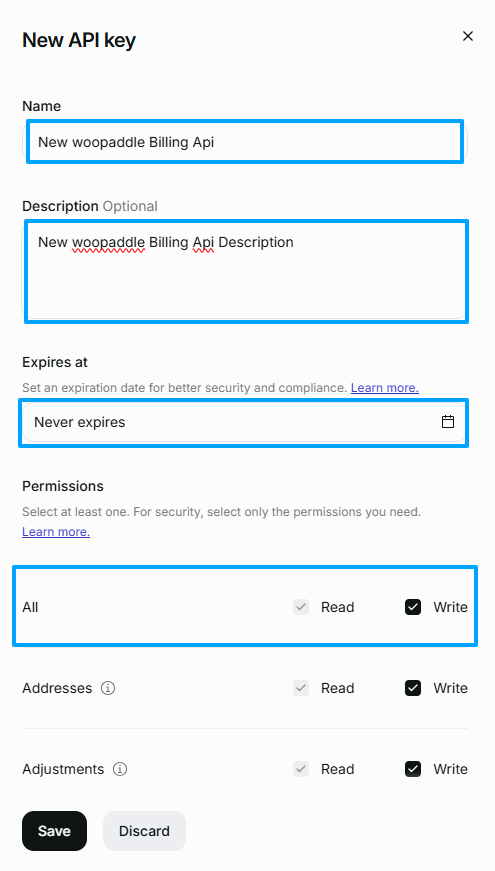
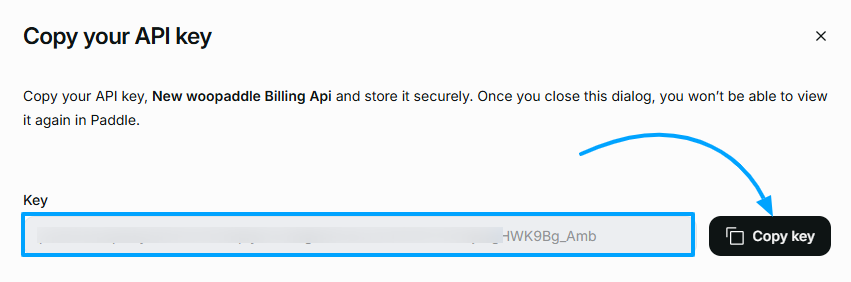
- Save these keys in a safe place because the dashboard will not display them again later.
- Copy the key to use it later on your WooPaddle settings.
Step 4: Generate Your Client Side Token
Generating Your Client Side Token
You must generate a specific client-side token to ensure your Paddle WordPress plugin syncs with the checkout interface. Here are the steps:
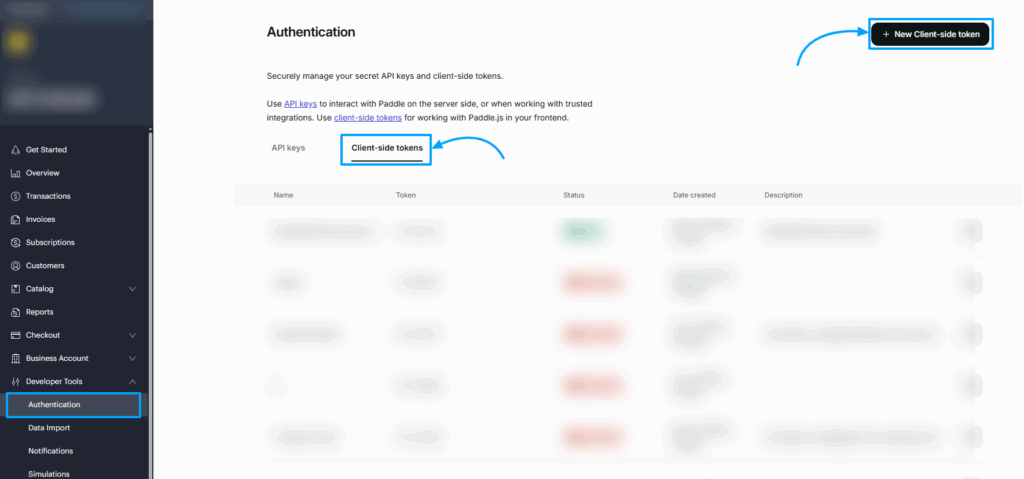
- Navigate to Developer Tools > Authentication menu inside your Paddle dashboard.
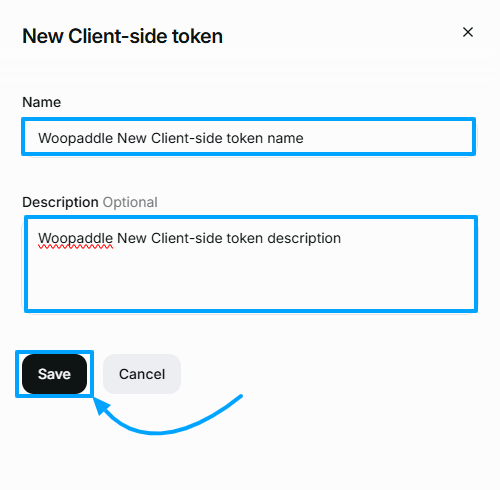
- In the top right corner, click the New Client-side tokens button.
- Provide a descriptive name for your token in the pop-up window.
- Click the save button to finalize the creation of your unique token.
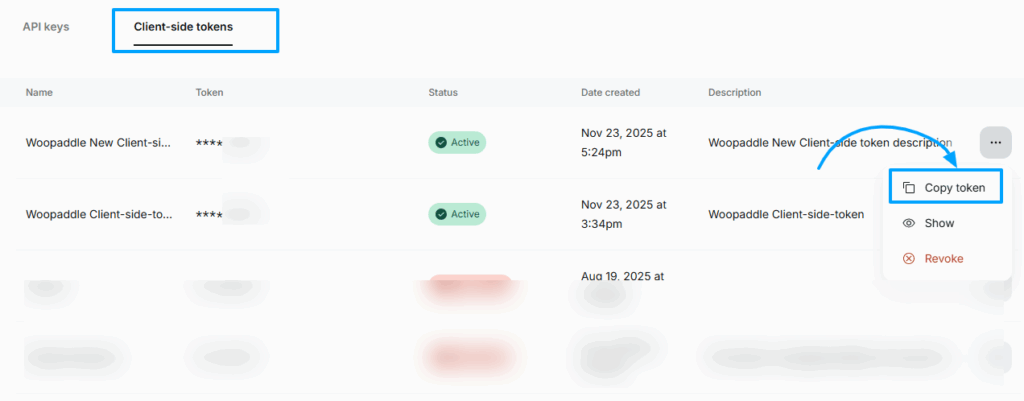
- Locate the three-dot menu icon next to the new token and select the copy option.
Step 5: Set Up Your Webhook URL
Configuring the webhook allows Paddle to send real-time payment notifications back to your store. Follow these steps to configure:
- Go to WooCommerce > Settings >Payments
- Find the Paddle.com payment gateway and click the Manage button beside it.
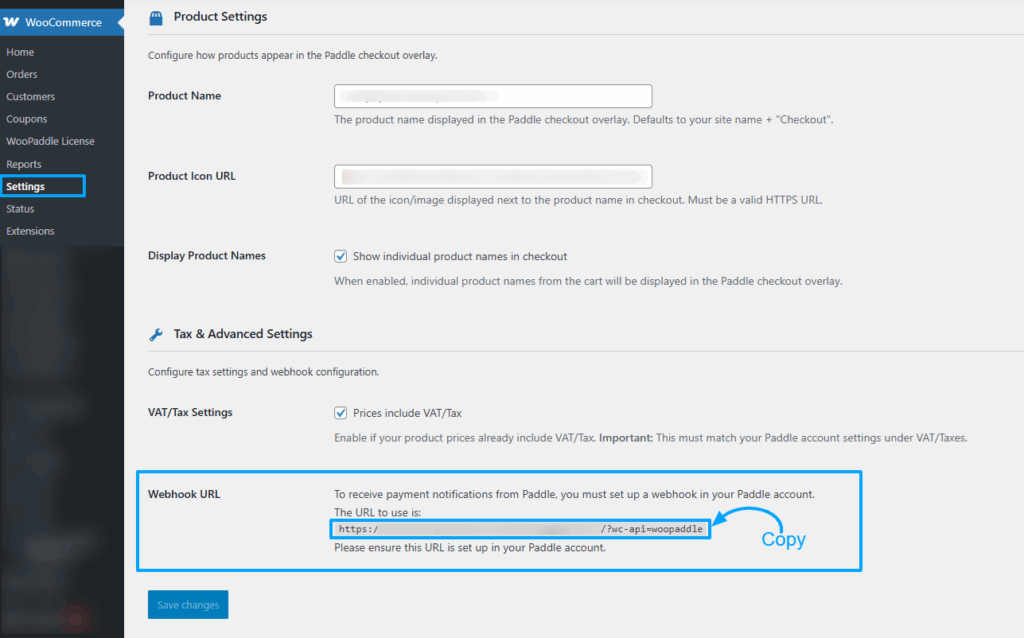
- Copy the unique webhook URL from your WooPaddle payment settings page.
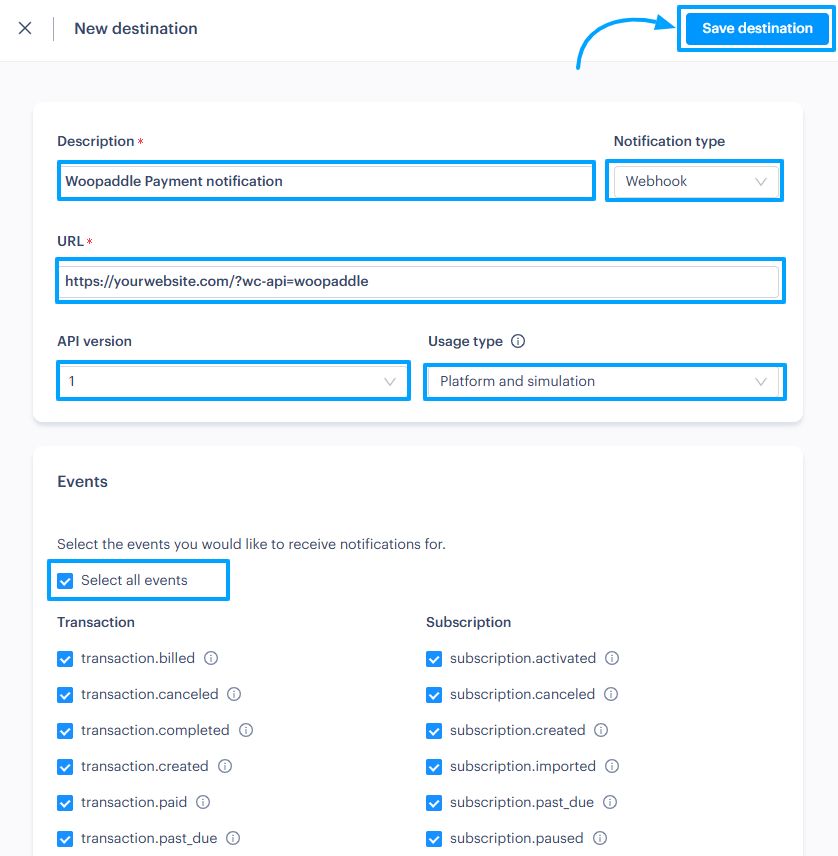
- Add a new notification destination in the developer tools area of your Paddle account.
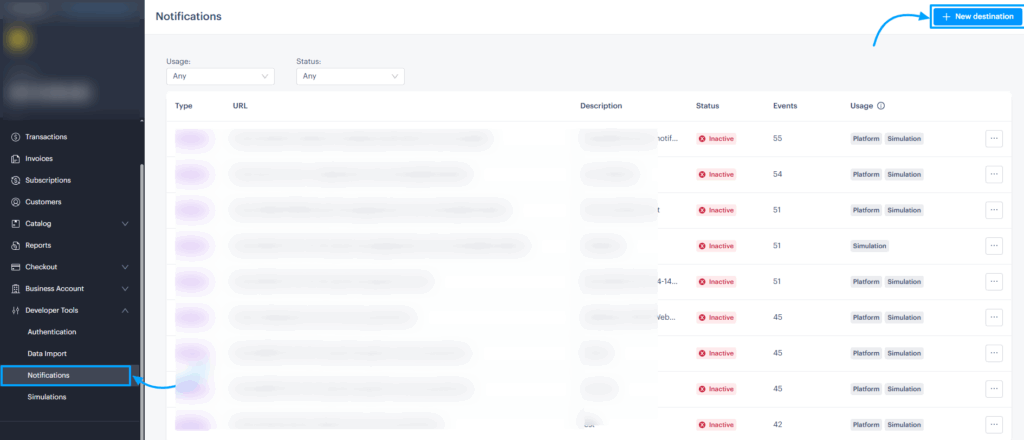
- Paste the webhook URL and select all transaction events to ensure every sale is tracked.
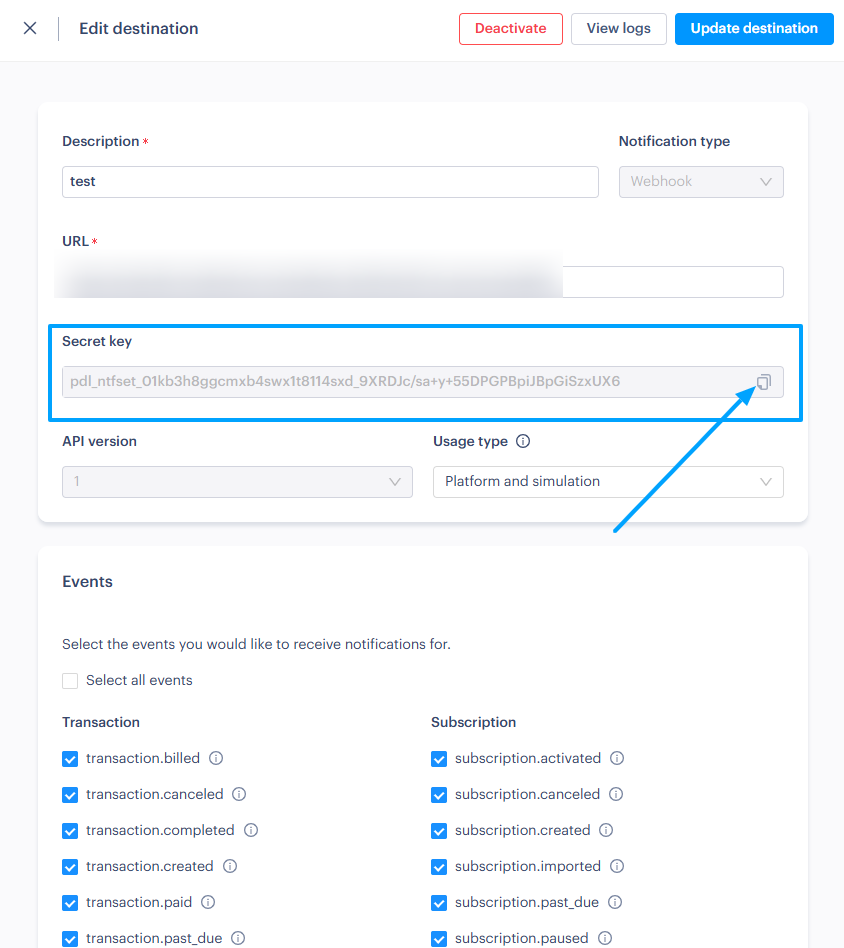
- Select the three-dot icon and click edit to access the destination settings.
- Locate the Secret ID field and click copy to save it to your clipboard.
Step 6: Configure WooPaddle in WooCommerce
The final step involves inputting your credentials to activate the full functionality of the Paddle WordPress Plugin.
- Enable the Paddle billing API option in your WooCommerce payment settings.
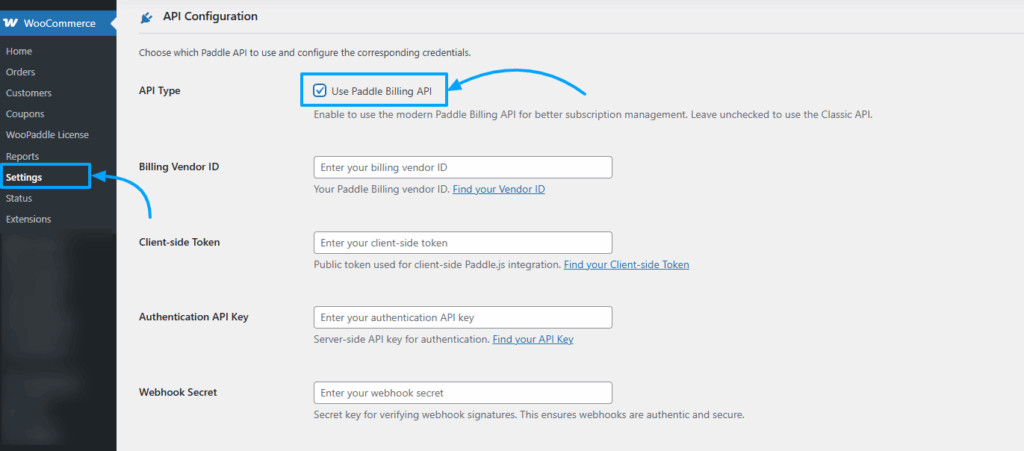
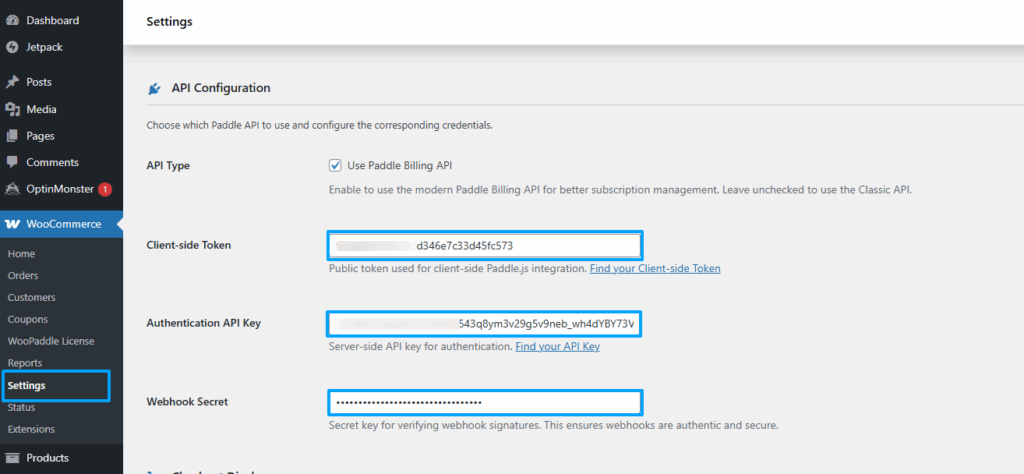
- Insert your Client-side token, API key, and Webhook secret ID into the corresponding fields.
- Click the Save Changes button to start accepting global payments from the WooCommerce Paddle payment gateway.
Note: Don’t forget to check whether the checkout works properly using the sandbox mode. Here is a detailed documentation for setting up the best Paddle WordPress plugin.
Final Recommendation
WooPaddle is the most efficient way to integrate Paddle with your WooCommerce store in 2026. It removes the technical and legal barriers associated with selling digital products internationally. By functioning as a comprehensive Paddle WordPress Plugin, it allows you to scale your business without increasing your administrative workload.
The plugin is particularly effective for software developers, SaaS founders, and course creators. While alternatives like WPSmartPay exist, the combination of a $69 lifetime price and modern feature support makes WooPaddle the top choice. If you want to stop worrying about VAT compliance and start focusing on growth, get WooPaddle today.
Frequently Asked Questions
Can I switch from Stripe or PayPal to WooPaddle without losing existing customers?
Migrating payment gateways requires customer action. Existing subscribers must re-enter payment information because Stripe/PayPal payment tokens cannot transfer to Paddle. You can migrate products, pricing, and order history. However, customers need to update their payment methods during their next billing cycle.
Does WooPaddle support the WooCommerce block checkout?
Yes, it is fully compatible with both the classic checkout and the modern block-based checkout pages. You can use the Gutenberg editor to place your checkout block without any compatibility issues.
Can I use the Paddle WordPress plugin with WooCommerce Subscriptions?
Yes, the plugin is designed to work with the official WooCommerce Subscriptions extension. It ensures that recurring payments are handled correctly by the Paddle billing engine.
Can I use WooPaddle alongside other payment gateways?
Yes. WooPaddle appears as one option in your WooCommerce checkout. Customers can choose between Paddle, Stripe, PayPal, or any other enabled gateways. You might offer Paddle for international customers while keeping PayPal for domestic transactions.
What happens if a payment fails?
Paddle has a built-in dunning system. It will automatically retry failed payments and send email notifications to your customers. This helps you recover revenue that might otherwise be lost.
Recommended Articles (Optional)
If you enjoyed this article, check out some of our other useful articles, where we share tips and tactics to grow your WooCommerce store and rate it from 0 to 100.
10 Best WooCommerce Themes for Selling Digital Products in 2026, where we have curated the most high-performance themes optimized for high conversion rates and rapid file delivery.
How to Sell PDFs Online With Paddle in WooCommerce, where we have detailed the exact steps to protect and deliver high-value documents while automating global VAT collection.
Start Selling Online Course with Paddle to Automate Your Taxes & Growth, where we’ve shown how you can sell online courses or digital products using the Paddle payment gateway.
How to Integrate Paddle for WordPress: The Fastest Method, where we’ve provided a path to integrate the Paddle payment on your WordPress site using the WooPaddle plugin.
This is a detailed and practical guide for WooCommerce users looking to simplify global payments, tax compliance, and subscription management with Paddle. The clear setup instructions and feature breakdown make WooPaddle an excellent solution for scaling digital businesses.